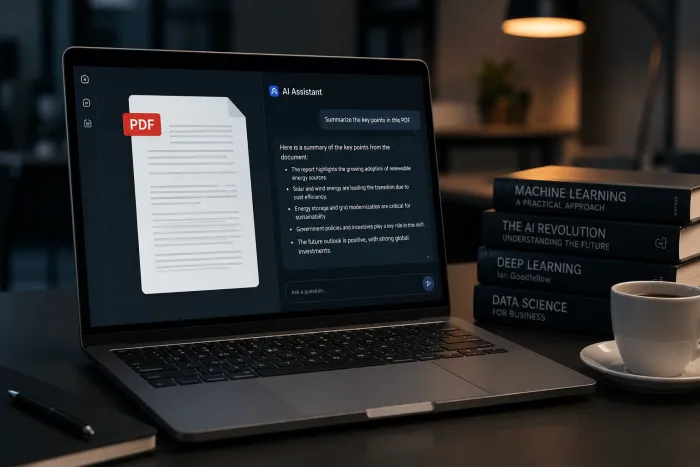
| Most AI prompts fail because they're vague. The fix isn't a longer prompt - it's a structured one. Tell the model who it is, what you need, for whom, and how to deliver it. The frameworks, examples, and templates below will turn any AI tool into a reliable writing, coding, and research partner. |
Everyone is using AI. Almost no one is using it well.
Walk into any office in 2026 and you'll see ChatGPT, Claude, Gemini, and DeepSeek open in dozens of tabs - yet most of the output landing in inboxes still reads like it was written by a polite robot with no idea who it's talking to. The bottleneck isn't the model. It's the prompt.
This guide breaks down exactly how professional writers, engineers, marketers, and researchers extract genuinely useful output from AI. You'll get the anatomy of a high-performing prompt, a repeatable framework, side-by-side examples, and five plug-and-play templates you can use today. Read it once, and your prompts will never sound generic again.
What you'll learn in this guide
• Why most AI prompts produce mediocre output (and the mindset shift that fixes it)
• The 5 building blocks every great prompt contains
• The CLEAR framework - a five-step recipe for consistent results
• Bad prompt vs. great prompt - three real, side-by-side comparisons
• Seven advanced techniques the pros use (few-shot, chain-of-thought, and more)
• Five common mistakes - and exactly how to fix them
• Five copy-paste prompt templates for email, blogs, code, summaries, and social
Why most AI prompts fail
Here's the uncomfortable truth: when an AI gives you a generic, bland, or unusable answer, the model isn't broken. It did exactly what you asked - you just didn't tell it what you actually wanted.
Most people type prompts the way they type Google searches: short, keyword-heavy, hoping the system reads their mind. But large language models aren't search engines. They're collaborators. The more clearly you brief them, the better they perform - exactly the same way a junior employee performs better with a clear brief than with a one-line Slack message.
Three patterns are responsible for roughly 90% of bad AI output:
1. The one-liner trap. "Write a blog post about productivity" gives the model nothing to work with. It will produce something - but something generic.
2. The kitchen-sink trap. Cramming six unrelated tasks into one prompt and expecting the model to juggle all of them coherently.
3. The missing reader trap. Forgetting to specify who the output is for. A blog for software engineers and a blog for retirees should not sound the same. Yet without a defined audience, the model defaults to "polite, neutral, and forgettable."
The mindset shift Stop thinking of prompts as questions. Start thinking of them as briefs. You're not interrogating the model - you're delegating a task to a brilliant but very literal assistant who needs context to do its best work. |
The 5 building blocks of a great prompt
Every prompt that consistently produces useful output contains some combination of five elements. You don't need all five every time, but the more deliberate you are about including them, the sharper your results.
The anatomy of a high-performing prompt - five reusable building blocks.
1. Role - tell the AI who it is
Assigning a role primes the model's output. Asking "how should I price my product?" produces textbook MBA-speak. Asking the model to respond "as a startup CFO who has priced 30 SaaS products" pulls in a tighter, more practical voice.
Quick example You are a senior pricing strategist who has worked with early-stage SaaS companies for 10 years... |
2. Context - give the relevant background
Without context, the model fills gaps with averages. With context, it tailors. Two sentences about your situation, audience, or product will outperform a one-line prompt every time.
3. Task - state exactly what you want
Be specific about the verb and the deliverable. "Help me with my landing page" is fuzzy. "Rewrite this hero headline in 5 variations, each under 10 words" is a brief.
4. Constraints - define the rules
Word count. Tone. What to avoid. The constraints you don't state are the constraints the model will violate. "Plain English, no marketing jargon, no exclamation marks" is gold.
5. Format - specify how to deliver it
Bullet points? A markdown table? JSON? A numbered list? Tell the model. Output format is the single fastest way to make AI responses immediately usable instead of having to reformat them by hand.
The CLEAR framework: a repeatable recipe
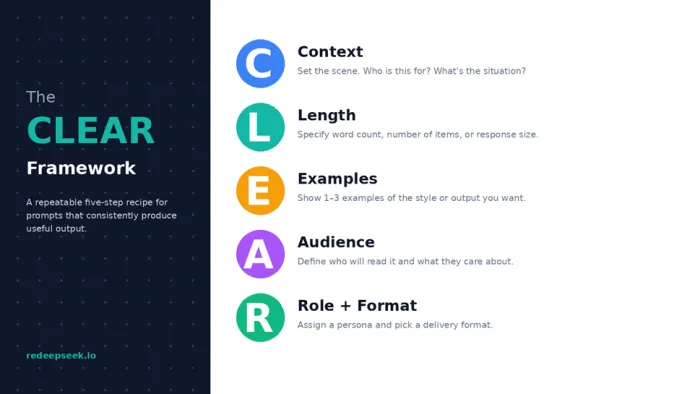
If the five building blocks tell you what to include, the CLEAR framework tells you the order to think about them. It's a memorable, repeatable checklist you can run through in under 30 seconds before sending any prompt.
The CLEAR framework - a five-step recipe for prompts that consistently produce useful output.
Here's how to use it on a real task. Imagine you need an AI to draft a launch announcement for a new feature. Walking through CLEAR takes about a minute and changes everything:
• Context: "We're a project management SaaS launching AI-generated meeting summaries. Beta users say it saves them 3 hours per week."
• Length: "Keep the post to 180 words."
• Examples: "Match the conversational, no-jargon tone of Linear's changelog. (Pasted sample below.)"
• Audience: "Our readers are operations leads at companies of 50–500 people."
• Role + Format: "You are our head of content. Return as a LinkedIn post with a strong opening hook and a single clear CTA."
That's a 60-second investment. The output you get back will be five times more usable than "write a launch post for our new feature."
Bad prompt vs. great prompt - three real comparisons
Theory is useful. Side-by-side examples are unforgettable. Here are three of the most common AI tasks, shown two ways.
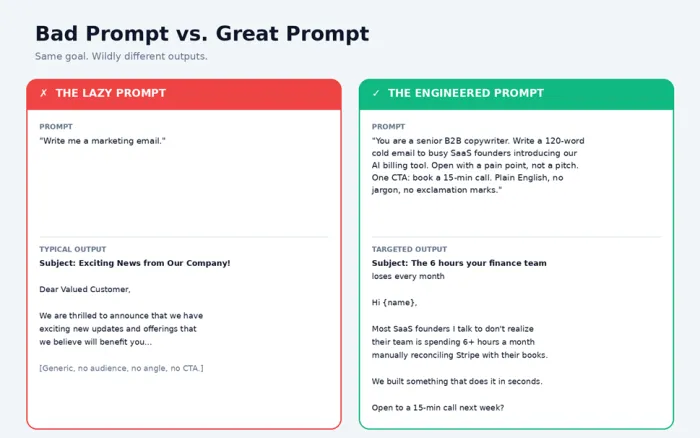
Same goal, two prompts. The difference between generic AI sludge and output you can actually use.
Example 1: Writing a cold email
Lazy prompt "Write me a marketing email." |
Output: A generic "Dear Valued Customer" email full of "exciting news" and zero specifics. Unusable.
Engineered prompt You are a senior B2B copywriter. Write a 120-word cold email to busy SaaS founders introducing our new AI-powered billing tool. - Open with a pain point, not a pitch. - Mention one specific benefit (saves 6+ hours/month on Stripe reconciliation). - Plain English, no jargon, no exclamation marks. - One CTA: book a 15-minute call. - End with a soft, conversational close. |
Output: A tight, specific email opening with a real pain point, one credible claim, and a single low-friction CTA. Send-ready.
Example 2: Asking for code
Lazy prompt "Write Python code to scrape a website." |
Output: Generic BeautifulSoup snippet for example.com. No error handling, no explanation, possibly the wrong library for your use case.
Engineered prompt You are a senior Python developer. Write a script that scrapes product titles and prices from an e-commerce site (assume the data is in <div class="product-card"> elements). Requirements: - Use requests + BeautifulSoup. - Add a 2-second delay between requests. - Handle 404s and connection errors gracefully. - Save results to a CSV. - Add inline comments explaining each block. Return only the code, then a short "How to run" section underneath. |
Output: Production-grade script with error handling, polite scraping behavior, and a runnable CSV export - plus instructions.
Example 3: Research and analysis
Lazy prompt "Compare ChatGPT and Claude." |
Output: Wikipedia-style overview that reads like marketing copy from both companies. No real takeaways.
Engineered prompt You are an AI research analyst. Compare ChatGPT, Claude, Gemini, and DeepSeek across 5 dimensions: reasoning, coding, writing quality, context window, and pricing. - Return as a markdown table. - Use 1–10 scores plus a one-sentence justification per cell. - Audience: a CTO choosing a default model for a 50-person company. - End with a 3-bullet recommendation. |
Output: A scannable comparison table, defensible scores, and an opinionated recommendation - exactly what a busy CTO would want.
7 advanced techniques that 10x your output
Once you have the basics, these are the moves that separate good prompters from people who get genuinely impressive results.
1. Few-shot prompting (show, don't tell)
Instead of describing the style you want, paste 1–3 examples of it. The model will pattern-match. This is the single highest-leverage technique in prompt engineering.
How it looks Rewrite each headline in the same punchy style as these examples: Example 1: "Your inbox isn't broken. Your priorities are." Example 2: “We don't need more meetings. We need fewer assumptions.” Now rewrite: "How to be more productive at work" |
2. Chain-of-thought prompting
For complex reasoning, ask the model to think step by step before answering. Adding the literal phrase "Think through this step by step before giving your final answer" significantly improves accuracy on math, logic, and multi-step planning tasks.
3. Role assignment (with specificity)
"Act as a marketer" is okay. "Act as a growth lead at a Series-B fintech who has run 200+ paid acquisition tests" is in another league. The more specific the role, the more specific the output.
4. Negative instructions
Tell the model what not to do. "Don't use the words 'leverage,' 'synergy,' or 'unlock.'" "Don't start sentences with 'In today's fast-paced world.'" Negative constraints are remarkably effective.
5. Iterative refinement
Don't expect the perfect answer on turn one. The first draft is a starting point. Reply with: "Tighten this. Cut 30%. Make the second paragraph more concrete." Treat AI as a writing partner you're editing with, not a vending machine.
6. Output format specification
"Return as a markdown table." "Return as JSON." "Return as a bulleted list with one sentence per bullet." Specifying format is a one-line change that often saves 10 minutes of cleanup.
7. The "explain to an expert" trick
"Explain like I'm 5" is overrated. Try the inverse: "Explain this as if you're talking to another senior engineer who already knows the basics - skip the introduction, get to the interesting parts." Massively reduces fluff.
5 common prompt mistakes (and how to fix them)
Mistake 1 - Vague verbs
"Help me with," "work on," "do something about" are not real instructions. Replace them with specific verbs: rewrite, summarize, list, compare, draft, critique, classify, translate.
Mistake 2 - No defined audience
Without an audience, the model writes for nobody. Always answer: who is reading this, and what do they care about?
Mistake 3 - Asking five things at once
"Write a blog, then summarize it for LinkedIn, then create five tweets, then suggest a thumbnail." The model will do all of them poorly. Break complex jobs into separate prompts.
Mistake 4 - No examples of "good"
If you can't define the style in words, paste an example. One paragraph of sample copy beats three paragraphs of style description.
Mistake 5 - Forgetting to constrain length
AI defaults to verbose. Always specify a length: word count, sentence count, bullet count. Otherwise you'll get 600 words when you wanted 150.
5 plug-and-play prompt templates you can steal
Copy these, fill in the brackets, and ship. Each one is built on the principles above, so they work across ChatGPT, Claude, Gemini, and DeepSeek with virtually no modification.
Template 1 - The cold email
Prompt template You are a senior B2B copywriter. Write a [WORD COUNT]-word cold email to [SPECIFIC PERSONA] introducing our [PRODUCT]. - Open with a pain point, not a pitch. - Reference one specific benefit: [BENEFIT WITH NUMBER]. - Plain English, no jargon, no exclamation marks. - One CTA: [SPECIFIC ACTION]. |
Template 2 - The blog post outline
Prompt template You are an expert content strategist. Create a detailed outline for a blog post titled "[TITLE]". - Audience: [WHO IS READING]. - Goal: [WHAT THEY SHOULD DO AFTER READING]. - Include: an H1, 5–7 H2 sections, key talking points under each, and a final CTA. - Match the tone of [REFERENCE BLOG OR BRAND]. - Suggest one custom infographic idea. |
Template 3 - The code review
Prompt template You are a senior [LANGUAGE] developer doing a code review. Review the function below for: correctness, performance, readability, and security. - Return findings as a numbered list, ordered by severity. - For each finding: 1) the issue, 2) why it matters, 3) the suggested fix (with code). - End with a one-sentence overall verdict. Code: [PASTE CODE] |
Template 4 - The meeting summary
Prompt template You are an executive assistant. Summarize the meeting transcript below. Return three sections: 1. Decisions made (bullets) 2. Action items (table: owner | task | due date) 3. Open questions (bullets) Skip pleasantries and small talk. Keep total length under 250 words. Transcript: [PASTE TRANSCRIPT] |
Template 5 - The social post
Prompt template You are a [PLATFORM] content creator. Write [N] post variations promoting [TOPIC]. - Audience: [WHO]. - Each post under [WORD/CHAR LIMIT]. - Each variation should test a different angle (problem, story, contrarian, data, question). - No emojis. No hashtag spam. Strong hook in the first line. |
The 80/20 of better AI prompts
If you forget everything else, remember this: specific beats clever. You don't need elaborate prompt-engineering tricks to get great output. You need to brief the AI the way you'd brief a smart, fast, slightly literal new hire - with context, audience, constraints, and a clear deliverable.
The frameworks in this guide aren't magic. They're scaffolding. Use them as training wheels for two weeks and you'll find yourself running through them automatically. That's the moment your AI tools stop producing generic content and start producing work you actually ship.
Your next move Pick one prompt you've used recently that produced disappointing output. Rewrite it using the CLEAR framework. Compare the two outputs side by side. The difference is everything you need to know about why prompt engineering matters. |