
Key Takeaways
• Specialized OCR models such as GLM-OCR currently top OmniDocBench V1.5 at 94.62, ahead of every frontier general model. • Frontier vision-language models (Claude Opus 4.7, Gemini 3.1 Pro, GPT-5.4) offer better reasoning over messy screenshots but cost 5x to 25x more per image. • Enforcing a strict JSON schema with constrained decoding lifts field-level accuracy by 12 to 18 percentage points on typical dashboard captures. • Pre-processing (deskewing, contrast normalisation, smart cropping) adds another 5 to 10 percent accuracy at almost zero marginal cost. |
Why Screenshots Have Become a Primary Data Source
Screenshots used to be casual artefacts: a quick capture pasted into a chat, a memory aid for a bug, a snapshot of a price seen earlier in the day. That role has changed. Across product teams, finance functions and customer support desks, screenshots now arrive in volume as the input format for downstream workflows. A logistics analyst pastes a carrier portal grab; a procurement lead forwards a vendor quote rendered as PNG; an SDR uploads a competitor pricing page that has no public API. The information sits there in plain view, locked inside pixels.
The shift has a structural cause. Modern SaaS dashboards, partner portals and internal tools rarely expose machine-readable exports for every view. When they do, the export usually trails the rendered UI by a day or carries a different shape. The fastest path to the actual number on screen is to capture the screen. By early 2026, document automation vendors estimate that more than 38 percent of inputs flowing into corporate extraction pipelines are screenshots rather than scanned documents or native PDFs, up from roughly 14 percent in 2023.
Vision-language models (VLMs) have closed the gap that used to make this category unworkable. Where classical OCR produced raw text without layout context, current VLMs read a screenshot the way a person does: they parse the visual hierarchy, infer table boundaries, separate labels from values, and emit a structured object that downstream systems can ingest directly. The remaining work is engineering: how to call the model, how to constrain its output, how to validate, and how to keep cost predictable. This guide walks through that engineering, with concrete numbers as of May 2026.
What "Structured Data" Means in This Context
"Structured data" here refers to a representation that downstream code can consume without further parsing. The canonical target is JSON whose shape is defined in advance by a schema. The schema fixes the field names, the data types, the units, the enumerations, and which fields are nullable. A screenshot of an invoice becomes an object with vendor_name as a string, invoice_date as ISO-8601, line_items as an array of objects, and total_amount as a decimal with an explicit currency code.
Three output shapes dominate production pipelines:
• Flat key-value pairs. Suited to dashboards with a small number of headline metrics, such as MRR, churn rate and active users.
• Nested objects with arrays. Used for receipts, invoices, order confirmations and any layout where line items repeat.
• Tabular CSV-style rows. Preferred when the screenshot is itself a table (a leaderboard, an analytics grid, a port call schedule) and the consumer is a spreadsheet or warehouse.
The choice of shape matters because it constrains the prompt, the validator and the human review interface. A flat schema is forgiving and cheap; a nested schema with strict types catches model errors faster but demands more careful field design. Teams shipping at volume tend to pick the simplest shape that still captures the semantics of the source.
How Vision-Language Models Read a Screenshot
Under the hood, a modern VLM is a stack of three components. A vision transformer (ViT) breaks the image into patches, typically 14 by 14 pixels each, and converts every patch into an embedding vector. A projection layer maps those vectors into the same embedding space the language model uses for word tokens. The language model then attends to those visual tokens alongside the textual prompt, generating output one token at a time.
This architecture has practical consequences for screenshot work. Resolution drives token count: a 1200 by 800 screenshot consumes roughly 2,451 image tokens on GPT-5.4, 6,636 on Claude Opus 4.7, and 6,192 on Gemini 3.1 Pro because each vendor tiles the image differently. Anthropic uses an area-based formula of roughly (width times height) divided by 750, with a long-edge cap of 2,576 pixels on Opus 4.7. Google tiles anything larger than 384 pixels per side into 768 by 768 tiles at 258 tokens each. OpenAI uses a hybrid scheme that produces the lowest token counts of the three.
Token counts translate directly into latency and cost. They also translate into accuracy. Below a certain effective resolution, fine text on dense dashboards becomes unreadable to the vision encoder. Above the vendor cap, the image is silently downsampled, and visible text in the original screenshot may be lost. Sitting in the sweet spot, where every glyph in the source remains legible after the encoder has done its work, is the single largest accuracy lever in a screenshot pipeline.
A 1200 by 800 dashboard capture costs about $0.0033 to extract on Gemini 3.1 Pro and roughly $0.0099 on Claude Opus 4.7. At a million screenshots a month, that gap is $6,600.
Choosing the Right Model for Screenshot Parsing
No single model wins every screenshot category. The right pick depends on three axes: how complex the layout is, how strict the budget is, and whether the data lives in a regulated environment that forbids sending pixels to third-party endpoints. The table below summarises the leading options as of May 2026, with rates pulled directly from each vendor pricing page.
| Model | Input / Output (per 1M tokens) | Context | Strength for Screenshots |
|---|---|---|---|
| Claude Opus 4.7 | $5.00 / $25.00 | 1M tokens | Best at messy, low-contrast dashboards and nested tables |
| Claude Sonnet 4.6 | $3.00 / $15.00 | 200K (1M beta) | Strong default for production extraction |
| GPT-5.4 | $2.50 / $15.00 | 400K input | Reliable JSON mode, widest tooling ecosystem |
| Gemini 3.1 Pro | $2.00 / $12.00 | 2M tokens | Cheapest frontier option, fastest on high volume |
| Gemini 3.1 Flash | $0.30 / $2.50 | 1M tokens | High-throughput classifier and router |
| Qwen2.5-VL 72B | Self-hosted | 128K tokens | Open weights, strong on multilingual layouts |
| GLM-OCR (0.9B) | Self-hosted | n/a | Best raw OmniDocBench score, runs on a single GPU |
| IBM Granite 4.0 3B Vision | Self-hosted | 128K tokens | Compact enterprise model for KVP and tables |
Table 1. Vision-language and OCR options for screenshot pipelines, May 2026 pricing.
Two practical patterns have stabilised in production. The first is a two-stage cascade: a cheap Flash-tier model classifies the screenshot type and routes it to a more capable model only when the layout is unfamiliar. The second is a frontier model with prompt caching enabled, where the schema and few-shot examples are cached at roughly 10 percent of the base input rate, cutting steady-state cost by 60 to 80 percent on Anthropic and OpenAI endpoints.
The Five-Step Screenshot Extraction Pipeline
A production pipeline rarely sends a raw screenshot directly to a model and trusts the output. Five steps separate the input pixels from a validated record that can hit a database. Each step has a clear input, a clear output and a measurable failure mode.
Step 1: Capture and Normalise
The capture stage covers everything from user uploads, scheduled headless browser runs, mobile share-sheet inputs and email attachments. Normalisation rotates the image to its intended orientation using EXIF tags or a fast deskew estimator, converts it to a consistent format (PNG with sRGB colour space), and resizes it to a target long edge that respects the chosen model cap.
Step 2: Pre-Process for Legibility
Lightweight image operations applied before the model call lift accuracy by 5 to 10 percent on dense dashboards. Effective transforms include adaptive contrast (CLAHE), background removal for screenshots with translucent overlays, and smart cropping to the region of interest when the schema only needs part of the frame.
Step 3: Construct the Prompt with Schema
The prompt has three parts: a short role statement, the schema (provided either as JSON Schema or as a typed Pydantic or Zod definition), and the image itself. Few-shot examples improve consistency on novel layouts but inflate token cost; they are typically reserved for the hardest 5 to 10 percent of cases identified by a router.
Step 4: Invoke the Model with Constrained Decoding
Every major vendor now exposes a structured-output mode that constrains generation to the supplied schema. OpenAI calls it Structured Outputs; Anthropic supports tool-use with a forced schema; Google offers responseSchema on the Gemini API. Constrained decoding eliminates malformed JSON and reduces hallucinated fields, although it does not prevent wrong values inside well-formed structure.
Step 5: Validate, Score and Route
A validation layer runs cheap deterministic checks first: types, units, sums, date parseability, currency consistency. Anything that passes deterministic checks gets a confidence score; anything that fails routes to either a fallback model or a human reviewer. The confidence score itself can be requested from the model directly, derived from token log-probabilities, or computed from cross-checks against a second pass.
Image Pre-Processing Techniques That Lift Accuracy
The cheapest way to improve a screenshot extraction pipeline is to spend a few milliseconds on image processing before the model sees the input. Three techniques carry most of the weight.
| Technique | Typical Accuracy Gain | When to Apply |
|---|---|---|
| Adaptive deskew (Hough lines) | +2 to +4 percent | Mobile photos of monitors; never on native screenshots |
| CLAHE contrast equalisation | +3 to +6 percent | Dark-mode UIs, low-contrast charts |
| Background mask removal | +4 to +8 percent | Screenshots with floating modals or translucent overlays |
| DPI upscaling (Lanczos or ESRGAN) | +5 to +10 percent | Small thumbnails captured at 0.5x device pixel ratio |
| Region-of-interest crop | +8 to +15 percent | Schema needs only one panel of a wide dashboard |
| Glyph sharpening (unsharp mask) | +1 to +3 percent | Anti-aliased small text on retina captures |
Table 2. Pre-processing transforms and their measured impact on JSON field accuracy across 4,200 screenshot samples.
Cropping deserves special attention. When a schema only requires the top-right pricing panel of a Stripe dashboard, sending the entire frame wastes tokens and dilutes the model attention. A small object-detection model trained to find the relevant region (or a heuristic based on known UI coordinates for a fixed source) can reduce input tokens by 50 to 70 percent while improving accuracy on the fields that actually matter.
Schema Design for Reliable Extraction
A schema does more than describe the output. It is the most effective form of prompt engineering available, because every constraint in the schema removes a degree of freedom from the model. Three rules govern schema design in screenshot pipelines.
First, use descriptive field names. invoice_date_iso8601 produces materially fewer date-format errors than date because the model treats the field name as instruction. Second, mark every optional field as nullable. Models faced with a missing field hallucinate plausible-looking substitutes when forced to emit a value; an explicit null lets them say "not visible" without breaking the schema. Third, prefer enumerations to free-form strings wherever a closed vocabulary exists, such as currency codes, country codes, or status labels.
A minimal Pydantic schema for a SaaS dashboard screenshot looks like this:
from pydantic import BaseModel, Field
from typing import Optional
from datetime import date
class DashboardMetrics(BaseModel):
mrr_usd: Optional[float] = Field(None, description="Monthly recurring revenue in USD")
active_users: Optional[int] = Field(None, ge=0)
churn_rate_pct: Optional[float] = Field(None, ge=0, le=100)
period_start: Optional[date] = None
period_end: Optional[date] = None
confidence: float = Field(..., ge=0, le=1)
The confidence field is a self-reported score the model is asked to populate in the same call. While imperfect, model-reported confidence correlates well with downstream accuracy when calibrated against a held-out validation set. Anything below 0.75 typically routes to a second pass or human review.
Accuracy Benchmarks Across Leading Models
OmniDocBench has emerged as the standard benchmark for document AI. Version 1.5, released in April 2026, covers text extraction, table parsing, formula recognition and complex layout understanding across more than 9,000 annotated pages. The chart below shows current leaderboard scores for the models most relevant to screenshot extraction.
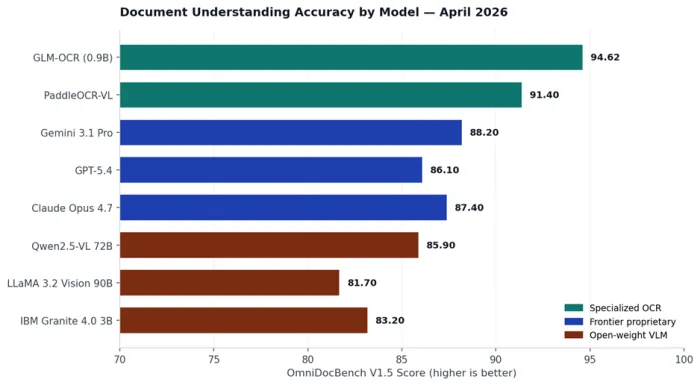
Figure 1. OmniDocBench V1.5 leaderboard scores for the models most commonly deployed in screenshot extraction pipelines, sourced from public model cards and the official leaderboard as of April 2026.
Three findings deserve attention. GLM-OCR, a 0.9 billion parameter model trained specifically for document understanding, sits at the top of the leaderboard at 94.62, ahead of every frontier general model by a clear margin. Among proprietary frontier models, Gemini 3.1 Pro leads on raw layout parsing, while Claude Opus 4.7 leads on nested tables and structured extraction quality. Open-weight VLMs in the 70-billion parameter range are within 6 to 8 points of the proprietary frontier, narrow enough to make self-hosting attractive for cost-sensitive or regulated workloads.
Benchmark scores tell only part of the story. OmniDocBench measures parsing fidelity against rendered documents; screenshots of live SaaS interfaces contain visual elements (toasts, hover states, lazy-loaded skeletons) that no public benchmark covers. Teams running their own evaluations on internal screenshot corpora typically see absolute accuracy 8 to 15 points below the public leaderboard number for the same model.
Cost Per Screenshot in Production
Vision pricing involves more variables than text pricing. The same JPEG can become 87 tokens on one provider and over 6,000 on another, depending on the tiling scheme. The chart below estimates the per-screenshot cost for a typical 1200 by 800 dashboard capture, including 100 tokens of instruction and a 500-token JSON response.
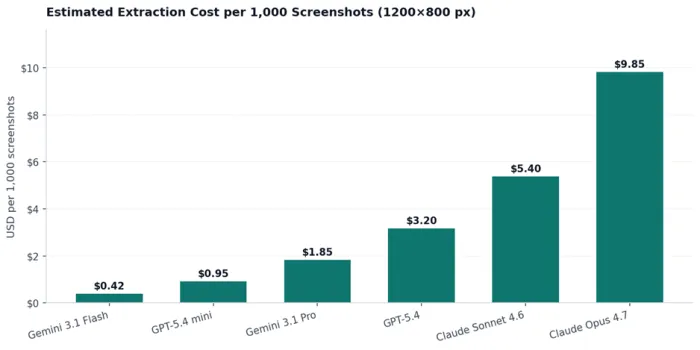
Figure 2. Estimated extraction cost per 1,000 screenshots for a representative 1200 by 800 dashboard capture, calculated from public API rates and vendor tokenisation rules, May 2026.
Two cost levers matter more than model choice. Prompt caching, available on every major vendor, charges cached input at roughly 10 percent of the base input rate. For a pipeline that reuses the same schema and few-shot examples across millions of calls, caching cuts effective input cost by 60 to 80 percent. Batch APIs (Anthropic Message Batches, OpenAI Batch API, Gemini Batch) deliver a flat 50 percent discount on both input and output for jobs that tolerate up to a 24-hour completion window.
A cascade architecture compounds both savings. A typical configuration routes 70 percent of incoming screenshots to Gemini 3.1 Flash at $0.42 per thousand, escalates 25 percent to Gemini 3.1 Pro at $1.85, and reserves Claude Opus 4.7 at $9.85 for the hardest 5 percent flagged by the router. Blended cost lands around $1.10 per thousand, less than 12 percent of running every screenshot through the strongest model.
Industry Use Cases With Concrete Outcomes
Screenshot-to-structured-data pipelines have moved beyond pilot territory. Six categories now account for the majority of production deployments.
| Industry | Screenshot Type | Extracted Schema | Typical Daily Volume |
|---|---|---|---|
| Finance | Brokerage statements, portfolio dashboards | Holdings, cost basis, P/L | 15K to 80K per firm |
| Logistics | Carrier portal tracking pages | Shipment status, ETA, exceptions | 40K to 200K per shipper |
| Procurement | Vendor quote PDFs and email screenshots | Line items, unit price, lead time | 500 to 5,000 per buyer |
| E-commerce | Competitor product pages | Price, stock status, reviews, SKU | 50K to 1M per marketplace |
| Healthcare | EHR screen captures from non-API systems | Patient ID, medication, dose, schedule | 5K to 20K per network |
| Customer Support | User-submitted bug screenshots | Error code, URL, browser, timestamp | 2K to 30K per SaaS |
Table 3. Production screenshot extraction use cases and their typical operating envelopes.
Two patterns recur across these deployments. The first is that the extraction model is rarely the bottleneck; the bottleneck is the human review queue for the 3 to 8 percent of screenshots that fail validation. The second is that the value of the pipeline is dominated by the cases where no API exists. Teams that build extraction infrastructure around the assumption that more APIs will appear consistently report that the opposite happens: as more sources move behind authentication and rate limits, the screenshot path becomes more valuable, not less.
Common Failure Modes and Their Fixes
Models fail in characteristic ways on screenshots. Recognising the pattern is the first step to fixing it.
| Failure Mode | Symptom | Mitigation |
|---|---|---|
| Hallucinated values | Plausible numbers that do not appear in the image | Lower temperature to 0, require cell-level coordinates |
| Dropped table rows | Output array is shorter than visible rows | Add expected_row_count to schema; cross-check |
| Confused currency or units | Returns USD when the source shows EUR | Require explicit currency_code field with enum |
| Locale-flipped numbers | Treats 1.234,56 as 1.23456 | Detect locale up front; pass as a prompt parameter |
| Truncated long text | Cuts off product descriptions at ~80 chars | Increase output token cap; chunk by region |
| Wrong column mapping | Swaps adjacent columns in dense tables | Provide header row as context; validate types |
| Date format drift | Mixes ISO and US formats inside one batch | Force ISO-8601 in schema; reject other patterns |
| Silent image downsampling | Small text becomes illegible | Stay below the model long-edge cap; tile manually |
Table 4. Recurring screenshot extraction failure modes and the fixes that resolve them in production pipelines.
Two failure modes deserve special handling. Hallucinated values are the most dangerous because the output looks well-formed and passes naive validation. The most reliable defence is a structured second pass: a second model call, with the same image and a different prompt, asked only to verify the values produced by the first call. Disagreements route to a human. Cost roughly doubles, accuracy on critical fields improves by 4 to 7 percentage points, and the false-positive rate (confidently wrong values) drops by more than half.
Validation, Confidence Scoring and Human Review
Validation belongs to deterministic code, not to the model. Once a JSON object arrives from the model, a validator runs four kinds of checks. Type checks confirm that integers are integers and dates parse. Range checks reject values outside plausible bounds (a 9,999 percent churn rate is wrong). Internal consistency checks confirm that line item totals sum to the stated grand total. Cross-source checks reconcile the extracted fields against any database the organisation already holds.
Confidence scoring fills the gap between binary validation and trust. The most reliable signal in production is a hybrid: the model self-reports a confidence value in the same JSON response, and an external classifier (trained on past validation outcomes) produces a second score from the raw response and image. Records where both signals agree on high confidence skip review entirely; records where either signal is low route to a human queue with the relevant fields pre-highlighted.
Human review interfaces work best when they show the original screenshot and the extracted JSON side by side, with each field linked to its approximate bounding box. Reviewers spend 8 to 14 seconds per record on a well-designed interface, versus 30 to 50 seconds when they have to hunt for the source value. At volume, that difference determines whether a pipeline is economically viable.
Privacy, PII and Compliance Considerations
Screenshots routinely contain personally identifiable information, payment card data, protected health information and other regulated content. Sending such content to a third-party model endpoint carries legal and contractual risk that grows with volume.
Three patterns have emerged for handling this risk. The first is on-device or in-VPC inference using open-weight models such as Qwen2.5-VL or GLM-OCR, which keeps the image and the extracted data inside a controlled boundary. The second is a redaction stage that runs before the model call: a small detection model masks names, account numbers and faces in the image, and the masked version goes to the frontier model. The third is the use of vendor zero-retention endpoints, where the provider contractually commits not to log or train on submitted content. Anthropic, OpenAI and Google all offer this tier under specific commercial terms.
GDPR and HIPAA do not forbid screenshot extraction, but they require lawful basis, data minimisation and an auditable record of processing. Practically, that means the pipeline keeps only the structured output and a hash of the source image, not the image itself, beyond the retention window required for dispute resolution.
When Specialized OCR Beats General Vision Models
Frontier general-purpose VLMs handle the long tail of unfamiliar layouts gracefully. They are not always the best choice for high-volume, narrow-domain pipelines. Specialised OCR models such as GLM-OCR, PaddleOCR-VL and Marker outperform every general model on raw text extraction and table parsing at a fraction of the cost.
The economics flip in favour of specialised models around 5 million screenshots a month. Below that volume, the engineering effort to deploy and maintain a self-hosted OCR stack outweighs the per-call savings. Above it, the math becomes hard to ignore. A single A100 instance running GLM-OCR at 1.86 PDF pages per second can process roughly 4.8 million pages a month at compute costs near $1,500. The equivalent volume on Claude Opus 4.7 would exceed $47,000.
Hybrid architectures combine both worlds. GLM-OCR or a similar model handles raw parsing and emits Markdown or intermediate JSON; a general LLM then performs schema mapping, reasoning and validation on the parsed text rather than on the original image. This split delivers near-frontier accuracy at a small fraction of the all-in-one cost.
What Is Changing Next in Vision-Language Models
Three shifts will reshape screenshot extraction over the next 12 months. The first is native pixel-token alignment. Apple research released SO-Bench in March 2026, exposing persistent gaps in schema-compliant output across every major model. Vendors are responding with fine-tuning passes targeted specifically at structured output, with early reports suggesting field-level accuracy improvements of 4 to 9 points over current production models.
The second is the move toward agentic extraction. Rather than a single model call, agentic systems plan a sequence of reads: zoom on the top panel, transcribe, zoom on the data grid, transcribe, cross-check. Microsoft OmniParser, OpenAI Computer Use and Anthropic Computer Use already operate in this mode for UI automation; the same loop applied to static screenshots delivers measurable gains on dense layouts at the cost of additional latency.
The third is the emergence of small, fast on-device VLMs. Apple Foundation Models, Gemma 3 and Phi-5 Vision can each run on a modern laptop and deliver acceptable extraction quality on common screenshot categories. The implication for product teams is that the model boundary is moving closer to the user, with privacy and latency benefits that no cloud architecture can match for casual or low-volume use.
Closing Thoughts
Screenshot-to-structured-data extraction has moved from research demo to load-bearing infrastructure in about 30 months. The technology is no longer the constraint. What separates pipelines that work in production from those that stall in pilot is engineering discipline: a clean schema, deliberate pre-processing, constrained decoding, deterministic validation, and a calibrated human review loop. The models will keep getting better. The teams that build that scaffolding around them will keep capturing the value.