If your social calendar is constantly empty by the 10th of every month, you are not alone. Most marketers and small business owners run out of ideas, time, or both - and the result is usually inconsistent posting, lower reach, and a slow drift away from the audiences they worked hard to build.
The good news is that building an entire month of high-quality social media content no longer takes a full week. With the right AI workflow, you can sit down on a Saturday afternoon, batch the heavy lifting, and walk away with 20–30 ready-to-publish posts mapped across your top platforms.
This guide breaks down the exact 4-hour process - from setting strategy and brainstorming hooks to drafting captions, designing visuals, and scheduling everything - using the AI tools that actually deliver in 2026. Every step is designed to keep your content sounding like you, not like a chatbot.
What you will get from this guide A 5-step workflow, a sample 1-week content calendar, a comparison of the best AI tools, posting frequency benchmarks for every major platform, and a checklist you can reuse every month. |
Why Batching With AI Beats Posting on the Fly
Daily content creation looks productive but it is one of the most expensive ways to manage social media. Every time you context-switch to write a caption, find a stat, or pick a hashtag, you pay a focus tax. Industry analyses consistently report that AI-assisted batching saves marketers around five hours every week - time that flows directly back into strategy, community, and creative direction.
Batching also raises the floor on quality. When you plan a full month at once, you spot gaps (too many promo posts, no educational content, three reels in a row), and you give yourself room to rotate formats - which is exactly what every major platform’s algorithm rewards in 2026.
The numbers that justify the shift
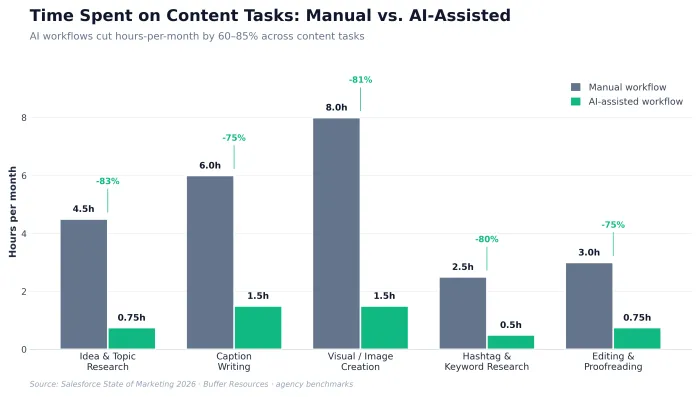
• Time: AI-assisted content workflows can cut content production hours by roughly 60–70% compared with a fully manual process.
• Volume: A single 4-hour batching session can realistically produce 25–30 posts spread across 2–3 platforms.
• Quality control: Editing pre-drafted AI output is faster than writing from scratch and forces a final human pass on every post - which is what algorithms and audiences both prefer.
What “Good” Looks Like in 2026: Platform Benchmarks
Before you build a calendar, anchor your goals to realistic numbers. The 2026 Socialinsider benchmark study, which analyzed roughly 70 million posts across the major platforms, makes the picture clear: TikTok still leads engagement by a wide margin, while Instagram and LinkedIn reward consistency and format variety more than raw volume.
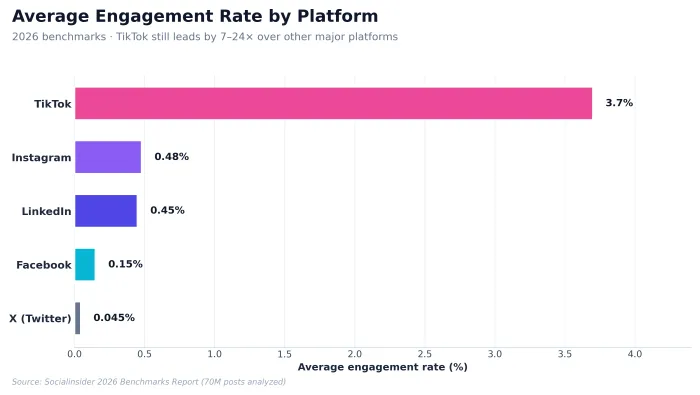
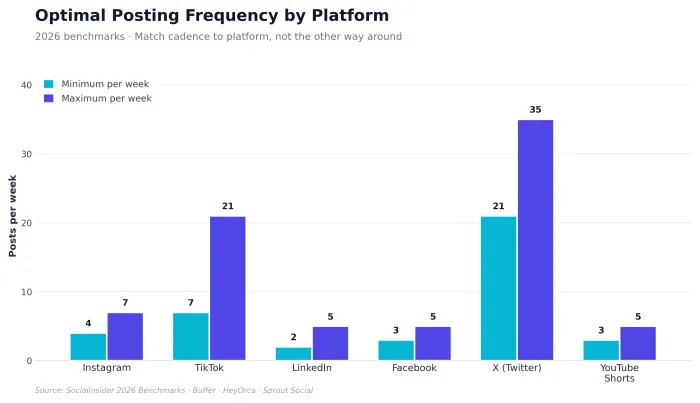
The takeaway is simple: do not chase the same posting cadence on every channel. Match the rhythm to the platform, and let your AI workflow handle the volume gap so you do not burn out.
The 4-Hour AI Content Workflow
Here is the exact sequence I use - and that I recommend to clients - to turn an empty calendar into a fully scheduled month. It is structured so each step feeds the next, which is what makes the whole thing fit inside a single afternoon.
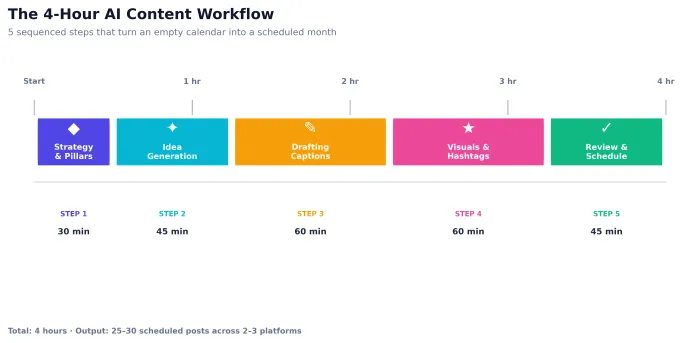
| Step | Phase | Duration | Output |
|---|---|---|---|
| 1 | Strategy & content pillars | 30 minutes | 4–5 themes mapped to audience and goals |
| 2 | AI-assisted idea generation | 45 minutes | 30+ topic hooks, mapped to a calendar |
| 3 | Drafting captions and copy | 60 minutes | All captions in your brand voice (edited) |
| 4 | Visuals, hashtags, alt text | 60 minutes | Templated graphics + research-backed tags |
| 5 | Review, approve, schedule | 45 minutes | Full calendar queued in your scheduler |
Step 1: Lock In Your Strategy and Content Pillars (30 minutes)
AI is fantastic at execution and average at strategy. If you skip this step, you will end up with 30 generic posts that do not move the needle. Spend the first half hour offline - or in a simple notes doc - answering four questions:
1. Who am I writing for? Define one primary audience segment and the problem you solve for them.
2. What is the goal of this month? Pick one: awareness, list growth, sales, or community.
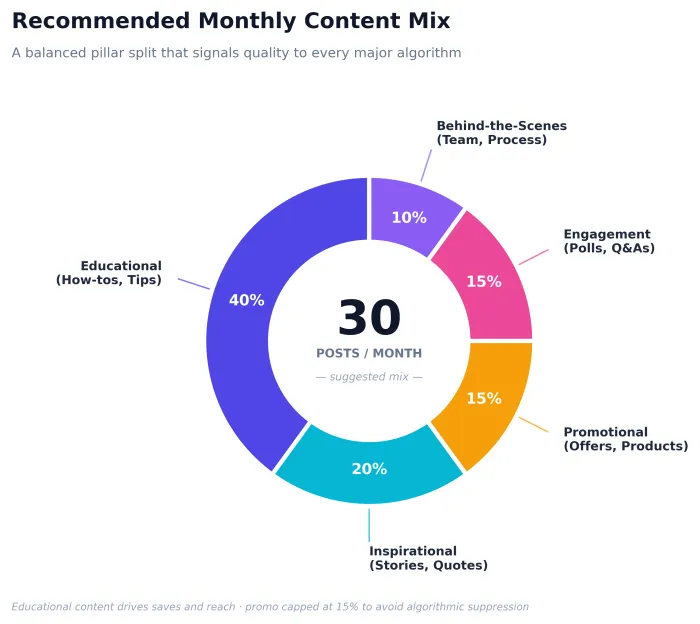
3. What 4–5 content pillars match that goal? For most brands these are educational, inspirational, promotional, engagement, and behind-the-scenes.
4. What is my brand voice in three adjectives? You will paste this into every AI prompt later.
Why pillars matter Pillars stop your feed from drifting into a stream of promos. A balanced pillar mix is also one of the most reliable signals algorithms use to keep distributing your content beyond your existing followers. |
Step 2: Generate a Month of Ideas With AI (45 minutes)
Now hand the strategy off to AI. Open your tool of choice - Claude, ChatGPT, or Gemini all work well for ideation - and run a structured prompt that maps directly to your pillars. The goal is not 30 generic ideas, but 30 pre-validated hooks you can already see your audience caring about.
A prompt template that actually works
You are a senior social media strategist for [BRAND], a [INDUSTRY] company that helps [AUDIENCE] do [OUTCOME]. Our brand voice is [3 adjectives]. Generate 30 specific post ideas for next month, distributed across these pillars: 40% educational, 20% inspirational, 15% promotional, 15% engagement, 10% behind-the-scenes. For each idea, return: a hook, the pillar, the best format (reel, carousel, static, text, story), and the platform it fits best. Avoid clichés and generic listicles.
You will get a usable first draft in under a minute. Skim it, kill any idea that feels off-brand, and ask the AI to regenerate the rejects. Two or three iterations is usually all it takes to land a full month of strong hooks.
Step 3: Draft Captions in Your Voice (60 minutes)
This is where most AI workflows go wrong. People paste the AI output straight into their scheduler and wonder why engagement drops. Audiences can feel generic AI text, and platform algorithms have started to penalize content that reads as mass-produced. The fix is to treat AI as a first draft, not a final draft.
A caption draft worth keeping has three things
• A specific hook: It promises one outcome the reader cares about, in their language.
• A clear payoff: A short list, story, stat, or framework - not vague advice.
• A natural CTA: A question, save prompt, or single link - not three different asks.
Run the captions in batches of five. Paste five hooks at a time into the AI with your brand voice notes attached, then edit each draft for at least 30 seconds. That edit is what keeps your content sounding human and on-brand - and it is the single highest-leverage habit in this whole workflow.
Pro tip: never publish the AI draft as-is Add one personal sentence to every post - a small detail from your week, a real customer name (with permission), or a contrarian opinion. That single line is what turns an AI-assisted post into a post your audience recognizes as yours. |
Step 4: Visuals, Hashtags, and Alt Text (60 minutes)
With captions locked, you now need the visuals, the hashtags, and the accessibility text. AI handles all three quickly if you set it up right.
Visuals
Open Canva (or Adobe Express) and pick three or four templates that match your brand kit. Duplicate the templates, then drop your captions in. For images, use Adobe Firefly or Canva’s built-in image generator - Firefly is the safer choice when you need commercial use rights, since it is trained on licensed content. For video, Opus Clip turns long videos, podcasts, or webinars into multiple platform-ready short clips with captions baked in.
Hashtags and keywords
Ask the AI to generate three hashtag sets per post: a high-volume set, a niche set, and a branded set. Mix them based on the platform - Instagram and TikTok still benefit from hashtags, while LinkedIn rewards 3–5 specific tags and X works better with 1–2.
Alt text
Have the AI write descriptive alt text for every image. This is good for accessibility, and it is one of the simplest SEO and discoverability boosts you can add - Google and on-platform search both index it.
The AI tools worth keeping in your stack
| Tool | Best For | Strength | Pricing (Approx.) |
|---|---|---|---|
| Claude | Long-form captions, brand voice, ideation | Natural, human-sounding writing | Free tier; Pro from ~$20/mo |
| ChatGPT | All-purpose drafting, idea brainstorming | Fast iteration, custom GPTs | Free tier; Plus ~$20/mo |
| Canva (Magic Studio) | Visuals, carousels, templates | Brand kit + Magic Design AI | Free; Pro ~$15/mo |
| Buffer / Hootsuite | Scheduling and analytics | Cross-platform queue + best-time | Free tier; paid from ~$6/mo |
| Opus Clip | Repurposing long video into short-form | Auto-clip + captions for Reels/Shorts | Free tier; paid from ~$15/mo |
| Adobe Firefly | Commercial-safe AI images | Trained on licensed content | Included with most CC plans |
Step 5: Review, Approve, and Schedule (45 minutes)
The final stretch is the easiest, but it is also where most of the wins are protected. Read every post out loud - yes, out loud - and you will catch the awkward phrasing AI sneaks in. Make sure each post has a clear single CTA, no broken links, the right tagged accounts, and the right hashtags.
Then load everything into your scheduler. Buffer, Hootsuite, Later, and Publer all support cross-platform scheduling and best-time posting. Use the “best time” feature, but do not over-trust it - you should still know your audience’s active hours from your own analytics. Once everything is queued, your job for the next 30 days is simple: show up, reply to comments, and watch what works.
A Sample 1-Week Calendar (Repeat Four Times = One Month)
You do not need a totally unique plan for every week of the month. A solid template that rotates pillars, formats, and platforms is enough. Here is one starter template that follows the recommended content mix and posting frequencies above:
| Day | Pillar | Topic Hook | Format | Primary Platform |
|---|---|---|---|---|
| Mon | Educational | “5 mistakes beginners make with…” | Carousel | Instagram + LinkedIn |
| Tue | Engagement | “Which one would you pick: A or B?” | Story / Poll | |
| Wed | Inspirational | Customer success story (mini case) | Reel / Short | Instagram + TikTok |
| Thu | Educational | “How we do X in 4 steps” | Long text post | |
| Fri | Behind-the-Scenes | Team workspace / process clip | Reel / Story | Instagram + TikTok |
| Sat | Promotional | Soft offer + clear CTA | Static + Story | All channels |
| Sun | Engagement | Recap / weekly question | Text / Carousel | LinkedIn + X |
Duplicate this seven-day grid four times for the month and swap the topic hooks. That is how you maintain consistency without burning out - and it is exactly what your AI workflow is feeding into.
5 Mistakes to Avoid When Using AI for Social Media
1. Publishing AI drafts unedited. Audiences and algorithms can both detect generic AI text. Always do a 30-second human pass.
2. Ignoring platform-specific cadence. A LinkedIn calendar is not a TikTok calendar. Posting frequency, formats, and tone all change.
3. Skipping strategy. AI amplifies whatever you give it. A weak strategy means 30 weak posts at scale.
4. Using one tool for everything. A small stack - one AI writer, one visual tool, one scheduler - beats trying to force a single platform to do all three jobs.
5. Forgetting community. Scheduling buys back time so you can spend it replying to comments, DMs, and mentions. That is where the real growth lives in 2026.
Staying Compliant: Disclosure and Responsible AI Use
A quick note on the part most blogs skip: as AI-assisted content becomes the norm, platforms are increasingly clear about disclosure. Meta, TikTok, LinkedIn, and YouTube all have policies covering synthetic media, and audiences in 2026 visibly prefer creators who are transparent about how they use AI. A few practical rules:
• Disclose AI-generated images and video - most platforms now offer a built-in toggle.
• Fact-check anything an AI tells you, especially statistics, legal claims, and medical or financial advice.
• Use commercial-safe image generators (Adobe Firefly is a strong default) when posts are tied to a brand or product.
• Keep customer data out of AI prompts. Anonymize before pasting.
Treat your AI tools as collaborators, not ghostwriters. The brands winning in 2026 are using AI to scale their voice - not replace it.
Putting It All Together
Building a month of social media content in one afternoon is not about working faster - it is about working in the right order. Strategy first, then ideas, then captions, then visuals, then scheduling. AI compresses every step except the first one, which is exactly why the workflow holds up.
Block out the four hours on your calendar. Set up your prompts and your templates the first time. From the second month onward, this becomes one of the most leveraged afternoons in your week - you trade reactive, scattered posting for a calm, consistent presence that compounds over time.
Your audience will not be able to tell that you wrote a month of content in a single sitting. They will only notice that you keep showing up - and in 2026, on every platform, that is still the single biggest predictor of growth.
Your next step Pick a 4-hour window this week. Open a fresh document, write your strategy answers from Step 1, and run the Step 2 prompt. Even if you only get through ideation and captions in your first session, you will be a full month ahead of where you were yesterday. |