Teacher adoption of artificial intelligence is no longer a curiosity. According to the EdWeek Research Center, 61 percent of K-12 teachers used AI in their work, nearly doubling the 32 percent figure from the year before. The Gallup-Walton Family Foundation survey found that teachers who use AI weekly save an average of 5.9 hours per week, roughly six full weeks of reclaimed time across an academic year.
The problem with most of those reclaimed hours is the output. AI-generated lesson plans tend to read as exactly what they are: predictable, formal, hollow, and easy to spot. Veteran teachers describe the resulting plans as competent on paper but unusable in class. The plans bullet-point everything. They overuse the words “engage,” “explore,” and “understand.” They never carry a teacher’s voice. Students notice within a week, and so do administrators.
The methods documented below come from EdWeek interviews, RAND survey responses, and prompt libraries shared in teacher-focused subreddits and professional Facebook groups during 2025 and early 2026. They are tactical, repeatable, and observable in the final output.
5.9 hours saved per week Teachers using AI weekly recover roughly six weeks of work time across a standard school year, but only when the output is usable. |
Why Robotic Lesson Plans Fail
Lesson plans are not blog posts. A blog reader scans, a class listens. When the underlying language is hollow, the entire delivery suffers. Three failure modes show up consistently in classroom observations and teacher feedback.
Loss of Authority in Front of Students
Middle and high school students recognize AI prose almost instantly. The phrase “In today’s rapidly evolving world” in an opening sentence undermines the teacher before the lesson begins. Once the class detects the source, attention drops and behavioral compliance follows it.
Mismatch with Actual Curriculum Standards
Generic AI output rarely lands within state standards or district pacing guides. Activities sound reasonable but skip prerequisite skills or assume materials the school does not stock. Plans that look complete fall apart at the photocopier.
Erosion of the Teacher’s Own Voice
Teachers who paste AI output without revision report that the practice spills into emails, parent communications, and report card comments. Over a semester, the entire written persona starts to read identically. Parents who receive ten messages a year notice.
Six Tells in AI-Generated Plans
Spotting machine-written content is the first skill teachers develop before learning to fix it. The six markers below appear in nearly every unedited generation from ChatGPT, Gemini, and Claude when standard prompts are used.
| Tell | What It Looks Like | Why It Happens |
|---|---|---|
| Uniform sentence length | Every sentence runs 18–24 words | Models optimize for predictable rhythm |
| Trigger vocabulary | “Delve,” “moreover,” “tapestry,” “navigate,” “utilize” | Statistical preference baked into training |
| Bullet overload | Three to five-item lists everywhere | Models default to enumerated structure |
| Hollow openers | “In today’s classroom,” “As we explore,” “It is important to note” | Generic transitions fill space without content |
| Symmetrical structure | Every section has the same number of items | Model balancing during generation |
| Em-dash flood | Two or more em-dashes per paragraph | Models reach for them when rhythm needs variation |
Recognizing all six in a draft takes practice but not long. The next five sections describe the techniques teachers use to prevent these patterns from appearing in the first place.
Voice Anchoring
The single most effective method. Before asking the AI to draft anything, paste two or three samples of writing the teacher actually values. This can be the teacher’s own previous lesson plans, a section of a textbook the class likes, or even a paragraph from a respected colleague. The AI then has a concrete target rather than its training-distribution average.
PROMPT · Voice anchoring template Below are three paragraphs from prior lesson plans written by this teacher. Analyze the tone, sentence rhythm, vocabulary, and structure. Then draft a new lesson plan on [TOPIC] for [GRADE LEVEL] that matches this voice exactly. Do not mimic generic textbook style. [Paste 2-3 paragraphs of actual prior writing here.] |
Teachers report this method produces the closest match to their authentic voice with the least editing afterward. The technique works because language models respond strongly to in-context examples, often outperforming abstract style instructions like “write in a conversational tone.”
Constraint Stacking
AI output gets more human when the model is forced to write under artificial limits. A single constraint helps; three or four stacked together break the model out of its statistical defaults entirely.
Common Constraints Teachers Layer In
• Maximum 15 words per sentence.
• No bullet points anywhere in the response.
• No words from this banned list: delve, moreover, furthermore, navigate, tapestry, utilize, leverage.
• Use contractions at least four times.
• Vary sentence length: one short, one long, one medium, repeat.
• Open the response with a question, not a statement.
PROMPT · Constraint stacking template Write a 30-minute lesson plan for [TOPIC] aimed at [GRADE LEVEL] students. Follow these constraints strictly: - No sentence longer than 15 words - No bullet points or numbered lists - Banned words: delve, moreover, furthermore, navigate, utilize - Use contractions - Vary sentence rhythm deliberately - Open with a question, not a declaration |
Specificity Injection
Generic prompts produce generic lessons. The difference between a robotic plan and a usable one is often the level of detail the teacher includes upfront. Specific students, specific resources, specific past lessons, specific time constraints: the more context provided, the less the model fills in with stock phrases.
Specifics Worth Naming
• Class size and approximate ability distribution.
• Two or three named student concerns (without identifying details).
• Specific materials available in the room.
• What the previous lesson actually covered, in plain language.
• How much time the lesson must fit, down to the minute.
• State standards by code if applicable.
PROMPT · Specificity injection example Draft a 42-minute math lesson on adding fractions with unlike denominators. Class: 24 sixth-graders, mixed ability, three on IEPs requiring visual scaffolding. Yesterday's lesson covered finding common denominators using prime factorization. Available materials: whiteboard, fraction tile sets, individual whiteboards. Standard: 6.NS.A.1. Skip introductions because students already know the vocabulary. |
Strategic Imperfection
AI output reads as machine-written partly because it is too polished. Real teaching documents include false starts, parenthetical asides, occasional sentence fragments, and the kind of small awkwardness that signals a human author. Teachers can either prompt for this directly or add it during editing.
Imperfections Worth Adding Back
• Occasional sentence fragments. Like this one.
• Parenthetical reminders (e.g., “remember to check the projector cable”).
• A first-person aside or two in instructor notes (note: this article keeps to third person, but lesson plans use first person regularly).
• Slightly informal phrasing in transitions, such as “Now shift to” rather than “Subsequently, transition to.”
• Real classroom details that no AI would invent: room temperature, the broken whiteboard marker, the loud HVAC vent.
BEFORE Furthermore, it is important to engage students through interactive exploration of the topic, encouraging them to delve into the material thoughtfully. | AFTER Hand out the worksheet. Give kids 4 minutes alone, then 4 minutes with a partner. Walk around. The HVAC is loud near the window. Stand by the door for the share-out. |
The Two-Pass Edit
No prompt produces a finished lesson plan. The teachers who get the best output run a deliberate two-pass edit on every generation: a structural pass followed by a voice pass. Each takes about three to five minutes.
Pass One: Structural
• Check that timing adds up to the actual class period.
• Verify the activity matches the stated standard or learning objective.
• Confirm all referenced materials exist in the room.
• Cut any section that does not move student learning forward.
Pass Two: Voice
• Read the plan out loud at speaking pace.
• Replace any sentence that sounds like a textbook with one that sounds like the teacher.
• Delete every “moreover,” “furthermore,” and “in conclusion.”
• Break at least one symmetric structure deliberately. A five-item list becomes a three-and-two split.
PROMPT · Self-audit pass (optional third pass) Review the lesson plan below. Identify every sentence that reads as AI-generated based on uniform rhythm, formal connectors, or hollow openers. List them with a brief reason for each. Do not rewrite. Just flag. |
Before and After Comparison
The example below shows the same 30-minute middle-school history lesson on the causes of World War I, first as generated by ChatGPT with a generic prompt, then after voice anchoring, constraint stacking, and a two-pass edit.
BEFORE Today, we will delve into the fascinating tapestry of historical events that led to the outbreak of World War I. Students will engage in an interactive exploration of the multifaceted causes, including militarism, alliances, imperialism, and nationalism. Through thoughtful analysis and collaborative discussion, learners will navigate the complex landscape of pre-war Europe and develop a deeper understanding of how these factors converged to shape one of history’s most pivotal conflicts. | AFTER Start by writing M-A-I-N on the board. Don’t explain it yet. Ask the class what they think the letters stand for. Take three guesses, no more. Then reveal: Militarism, Alliances, Imperialism, Nationalism. Give each student one of the four. They have 8 minutes to find one specific example from the textbook or the handout. Then they teach their letter to one other person. Switch partners. Teach again. Twelve minutes total for that exchange. Last 6 minutes: cold call three students to summarize a letter they did not own. Homework on page 84. |
The second version is shorter, more specific, harder to write without context, and immediately recognizable as the work of someone who has actually run that class.
Adoption Data Worth Knowing
Teachers considering whether to invest time learning these techniques can look at the trajectory of AI adoption in education as a leading indicator of where peer practice is heading.
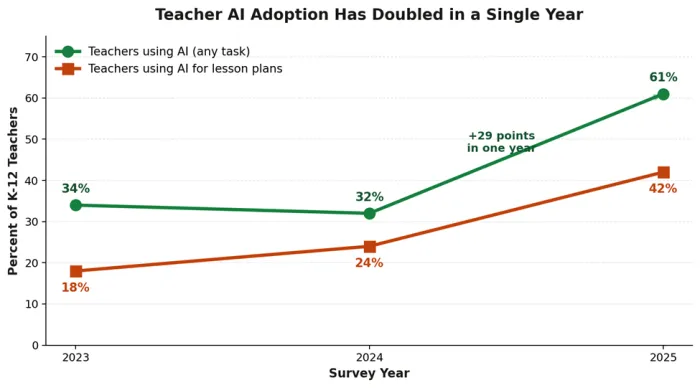
Teacher AI adoption nearly doubled between 2024 and 2025
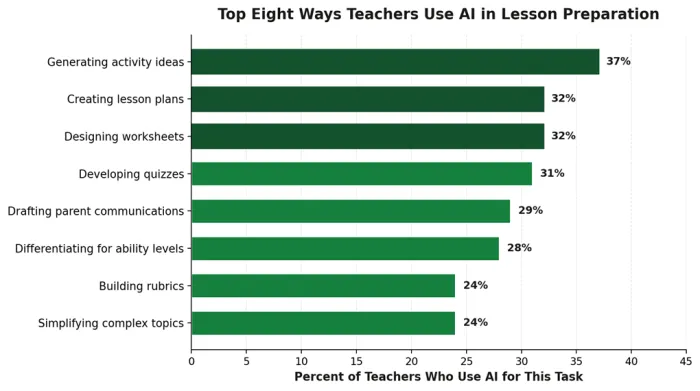
Most common AI use cases reported by teachers in 2025 surveys
Findings That Matter
• High school teachers lead adoption at 69 percent in 2025, ahead of elementary at 42 percent and pre-K at 33 percent.
• Less experienced teachers adopt AI faster than those with ten-plus years of teaching experience, per RAND.
• 74 percent of teachers using AI say it improves the quality of administrative work, not just the speed.
• The Walton Family Foundation found 71 percent of teachers support AI use in schools, the highest support level recorded.
Tools Teachers Reach For
The teacher-specific AI tools that appeared most often in EdWeek interviews and Reddit threads during 2025 and 2026 fall into two camps: dedicated teacher platforms with curriculum templates, and general-purpose models adapted with strong prompts. The quadrant chart maps how these tools compare on ease of use and customization depth.
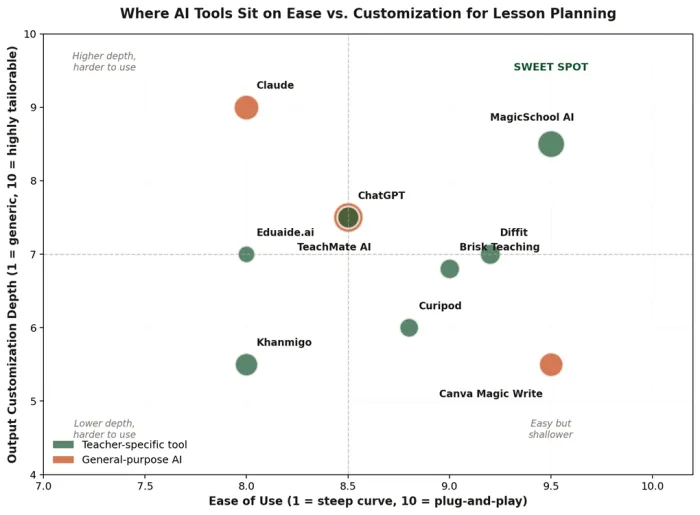
AI tool positioning for lesson planning use cases
Teacher-Specific Platforms
| Tool | What Teachers Use It For |
|---|---|
| MagicSchool AI | Lesson plans, rubrics, IEP drafts, and parent letters from 80-plus prebuilt tools. |
| Diffit | Generates leveled reading passages and comprehension questions from any topic or text. |
| Curipod | Builds interactive slide decks with embedded polls, word clouds, and exit tickets. |
| Khanmigo | Khan Academy’s AI tutor and teacher copilot, integrated with the existing curriculum library. |
| Brisk Teaching | Chrome extension that adds AI feedback, leveling, and quiz generation to Google Docs and Slides. |
| TeachMate AI | UK-built lesson planner aligned to national curriculum standards. |
| Eduaide.ai | Resource generator with over 100 templates for assessments, activities, and intervention plans. |
General-Purpose Models
ChatGPT, Claude, and Gemini all remain in heavy use because they offer maximum flexibility. Claude in particular shows up frequently in teacher recommendations for tone work, since reviewers cite it as producing the warmest default voice of the three. ChatGPT carries the broadest plugin ecosystem. Gemini integrates natively with Google Workspace, which matters in districts standardized on Google Classroom.
Common Mistakes That Reintroduce Robotic Voice
Mistake 1: Single-Shot Prompting
Generating a full lesson plan in one prompt almost guarantees generic output. Teachers who break the task into pieces, starting with the objective, then activities, then assessment, then differentiation, get noticeably better results in less total time.
Mistake 2: Asking for “Creative” Output
Adjectives like “creative,” “engaging,” and “fun” trigger trained patterns that include the very phrases teachers most want to avoid. Concrete constraints (“use a card-sorting activity”) outperform abstract ones (“make it fun”).
Mistake 3: Skipping the Voice Pass
The temptation to ship a generated plan untouched is strongest when time is short, which is exactly when AI tells are most likely to land in front of students. The voice pass takes roughly three minutes and prevents the most visible failures.
Mistake 4: Reusing the Same Prompt Forever
A prompt that worked in September stops working in February as models update and as the teacher’s own voice evolves. Refreshing voice-anchor samples every quarter keeps output aligned.
Mistake 5: Treating AI Output as Final Drafts
The most successful adopters treat AI output as a first draft from an unfamiliar substitute teacher: useful as a starting point, never appropriate to hand in directly.
Subject-Specific Adaptations
| Subject | What AI Tends to Get Wrong | Adaptation That Works |
|---|---|---|
| Math | Plausible-but-wrong word problems; incorrect arithmetic in answer keys | Always verify generated problems by working them through; never publish unchecked |
| English Language Arts | Surface-level discussion questions; predictable thesis prompts | Inject specific student misconceptions from the actual class as constraints |
| Science | Outdated terminology; lab safety errors; vague success criteria | Cross-check against district safety protocols; verify against current standards |
| Social Studies | Surface-level treatment of contested topics; oversimplified causation | Require multiple sourced perspectives in the prompt; flag balance explicitly |
| Foreign Languages | Stilted phrasings that no native speaker would use | Anchor with authentic native-speaker text samples in the prompt |
| Elementary | Reading levels off by one to three grade bands; vocabulary too abstract | Use Diffit or specify target Lexile range; verify against actual classroom level |