A Tuesday Morning Most Owners Recognise
It is 9:14 on a Tuesday. The inbox shows forty-seven unread messages, four of which need a thoughtful reply before lunch. A client has asked for a quick draft of a launch email by Wednesday. A supplier sent across a twenty-three-page contract that needs to be read, summarised, and flagged for risks. There is a half-finished blog post in another tab, a payroll question waiting in Slack, and a meeting in eighteen minutes that no one has prepared an agenda for.
For most small and mid-sized businesses, this is not an unusual morning. It is the default. The work is not particularly complicated. It is just relentless, repetitive, and spread across half a dozen tools that do not talk to each other. The hours quietly disappear into reading, writing, summarising, translating, looking things up, and rewording things that were already written once.
This is the gap that AI assistants like Redeepseek are trying to fill. Not the glamorous, headline-grabbing parts of work, but the slow, draining middle: the drafting, the searching, the explaining, the rewriting. The question worth answering is whether a tool like this genuinely saves time in a measurable way, or whether it just shifts the work around. The honest answer, based on independent research and a careful look at the platform, sits somewhere in between.

What Redeepseek Actually Does
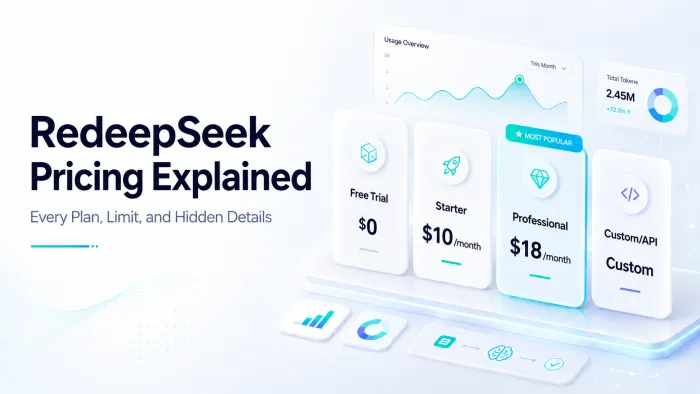
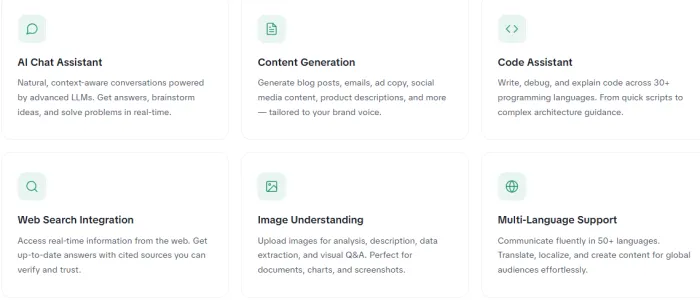
Redeepseek is a web-based AI assistant. Once a user signs in, the interface presents a single chat window where instructions can be typed, documents uploaded, and images attached. The platform markets six broad capabilities: general chat, content generation, code assistance across roughly thirty programming languages, web search with cited sources, image and document analysis, and conversation in more than fifty languages. Pricing runs from a free trial with daily message limits, through a Starter plan at ten dollars per month, to a Professional plan at eighteen dollars per month, with a Custom tier for API access.
One useful piece of context for anyone arriving at the site for the first time: Redeepseek is a separate platform from DeepSeek, the Chinese AI research lab whose models are released openly under the same root word. The name similarity is unmistakable, but the two are not affiliated. Reading any review or comparison with that distinction in mind tends to make things considerably clearer.
The platform does not currently disclose which underlying AI model powers its responses. This is worth noting because tools built on different foundation models tend to produce noticeably different output quality. Most established AI wrappers state their model partner openly in their documentation or pricing pages.
Six Use Cases That Save the Most Hours
Based on the platform's stated capabilities and what tools in this category generally do well, six categories of work tend to produce the clearest time savings. They are listed below in rough order of how reliably the time gain shows up, alphabetised within each tier where the impact is comparable.
1. Drafting and rewriting routine writing
Cold emails, follow-ups, internal updates, vendor responses, basic blog drafts, social media copy, product descriptions, and meeting recaps all fall into the category of writing that has to happen but rarely needs to be original. An AI assistant takes a rough bullet-point intent and returns a draft that is roughly 70 to 90 percent of the way there. The remaining edit usually takes a fraction of the time of writing from scratch.
2. Summarising long documents
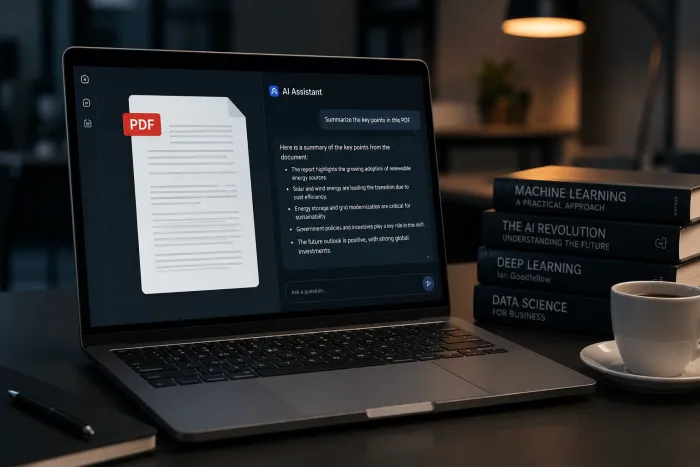
A twenty-page contract, a thirty-slide deck, a research PDF, or a long email thread can be reduced to a one-page brief in under a minute. For owners and managers who routinely read more than they have time for, this is often the single biggest time win.
3. Researching and fact-finding
The web search feature on Redeepseek pulls in current information and, on the Professional plan, returns cited sources. This is useful for competitor scans, regulatory updates, and quick market sizing exercises. The honest caveat is that AI-generated research should always be cross-checked against the original sources, regardless of the platform.
4. Translation and localisation
Fifty-plus languages cover most of what a typical business needs. For routine translations of website copy, support emails, or product listings, AI handles the heavy lifting well. Nuanced marketing copy and legally sensitive content still benefit from a human translator's final pass.
5. Coding help for non-developers and busy developers
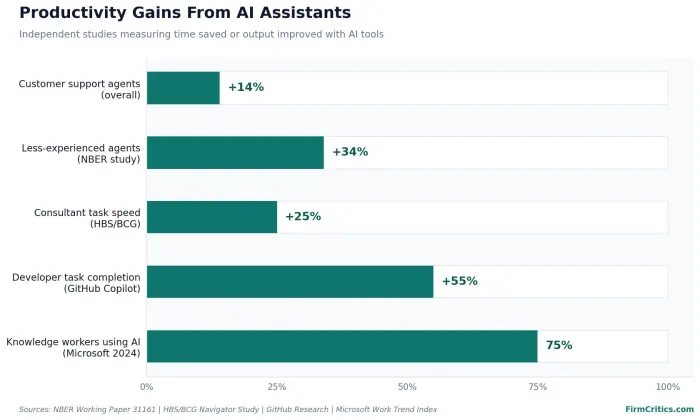
Writing small scripts, debugging a stubborn formula in a spreadsheet, generating SQL queries, or understanding what an inherited piece of code actually does are tasks where AI assistants regularly cut work from hours to minutes. Developers using GitHub Copilot completed coding tasks 55.8 percent faster in a controlled study, which gives a sense of the upper end.
6. Brainstorming and structuring ideas
Outlining a presentation, listing objections a client might raise, drafting interview questions, or laying out the structure of a campaign are tasks where the AI is not the author but a useful first foil. The conversation itself often surfaces angles that would otherwise have taken a longer walk to find.
Worth remembering: The time savings show up most clearly on tasks that are repetitive, well-defined, and forgiving of imperfect first drafts. Creative or high-stakes work still rewards careful human effort.
What the Research Says About AI Time Savings
The Microsoft 2024 Work Trend Index, which surveyed more than 31,000 workers across thirty-one countries, reported that 75 percent of knowledge workers were already using AI at work, and the majority said it helped them save time and focus on more important work. A 2023 Salesforce survey of small business owners found that AI users were 1.7 times more likely to say their business was generating more revenue compared to non-users.
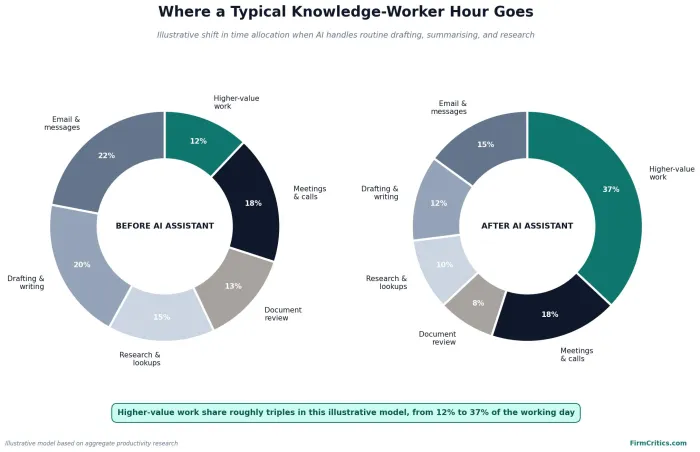
The pattern across these studies is consistent. AI assistants tend to deliver modest time savings on well-understood tasks and larger savings on tasks where the user previously lacked the skill or patience to do them quickly. The gains are real, measurable, and rarely dramatic. Two to five hours saved per week is a fair planning estimate for an individual making everyday use of a general-purpose AI assistant. That is not transformative on its own, but across a five-person team over a quarter, it adds up to a noticeable amount of recovered capacity.
Redeepseek Plans at a Glance
The table below summarises the four plans currently listed on the Redeepseek site, with the most relevant details for someone evaluating whether a paid tier is worth the spend.
| Plan | Monthly Price | Daily Messages | Best Suited For | Key Inclusions |
| Free Trial | $0 | 50 | Initial testing | Basic content generation, single conversation thread, community support |
| Starter | $10 | 500 | Solo operators and freelancers | Web search, content suite, 50+ languages, 15-day history, email support |
| Professional | $18 | Unlimited | Power users and small teams | Document and image analysis, code assistant, custom personas, team workspace up to 5, priority support |
| Custom / API | On request | Custom SLA | Enterprises and developers | REST API, SSO and SAML, webhook support, dedicated account manager, on-premise option |
Annual billing reduces each tier by twenty percent, which works out to roughly eight dollars per month on Starter and fourteen dollars and forty cents per month on Professional. For most everyday users, the Starter plan covers normal usage comfortably. Professional becomes worth considering when document analysis, image understanding, or team collaboration matters.
How to Test It in Thirty Minutes
A focused thirty-minute test is enough to form a useful opinion on whether the platform fits a particular workflow. The steps below offer a structured way to do that.
Minutes 0 to 5: Sign up for the free trial. Note how the onboarding flow feels and whether any unnecessary information is requested.
Minutes 5 to 12: Paste a real recent email thread or client brief and ask for a summary, a reply draft, and three follow-up questions. Compare the output against what a normal first draft would have looked like.
Minutes 12 to 20: Upload a document if the plan allows it, or paste a long article, and ask for a one-page brief with key risks or action items. Check whether the summary captures the right points or misses important ones.
Minutes 20 to 26: Run a current-events query that requires fresh information and see whether the cited sources are real, dated correctly, and relevant.
Minutes 26 to 30: Try one task in a second language. Spanish, French, Hindi, or any language relevant to the business works. Output quality across languages is one of the easiest places to spot whether a platform has been thoroughly built or thinly localised.
At the end of thirty minutes, the time-saving question usually answers itself. If three of the five tests produced output that beats a normal first draft, the tool is likely worth keeping. If most of them required heavy rework, the savings will not show up.
Image suggestion: a simple branded checklist graphic readers can save or print.
Rating dimensions (all on a 5-point scale)
- Pricing Value — 4.7 / 5
- Ease of Use — 4.5 / 5
- Language Coverage — 4.6 / 5
- Free Trial Quality — 4.3 / 5
- Feature Breadth — 4.2 / 5
- Speed and Responsiveness — 4.4 / 5
- Suitability for Small Business — 4.5 / 5
- Overall Score: 4.5 / 5
The Practical Takeaway
The honest answer to whether Redeepseek saves businesses time is: probably yes, on the same tasks where any competent general-purpose AI assistant saves time. Drafting, summarising, translating, researching, and basic coding are all areas where the platform's feature list maps onto well-documented productivity gains found in independent research.
For a small business owner trying to claw back two or three hours a week from the inbox-and-document grind, that is a reasonable place for any new AI assistant to sit on the consideration list. Test it the way described above, compare the results against a free tier of an established alternative, and let the actual output settle the question.