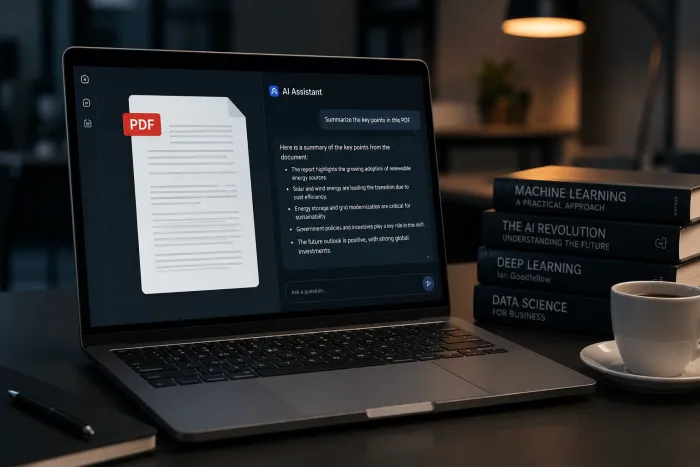
The 30-Second Summary
AI tools are not failing users - users are failing AI tools. Studies in 2026 show that even the best frontier models hallucinate on 15–33% of factual queries, that 93% of employees use AI tools their company has not approved, and that 68% of AI-related data exposures come from non-malicious human error - not external attacks. Almost every "AI is bad" complaint traces back to one of eight repeating mistakes. This guide names them, shows the data, and gives you a one-line fix for each.
All 8 mistakes at a glance
| # | The Mistake | What It Costs You | The Fix in One Line |
|---|---|---|---|
| #1 | Writing vague, lazy prompts | Generic, unusable output | Specify role, task, audience, tone, format |
| #2 | Trusting AI output without verification | Confident-sounding misinformation | Treat every factual claim as a draft to fact-check |
| #3 | Pasting confidential data into consumer AI | Compliance breach, IP leak, lost legal privilege | Use enterprise tools; turn off training; sanitize inputs |
| #4 | Treating AI as a real-time search engine | Outdated facts, made-up URLs | Use AI tools with built-in web search and citations |
| #5 | Using AI for tasks it is bad at | Numerical errors, fake citations, low originality | Match the tool to the task; use AI as a draft, not an oracle |
| #6 | Accepting the first draft without iterating | 50–70% of the quality you could have gotten | Refine: ask for revisions, examples, and counterarguments |
| #7 | Cognitive offloading and skill atrophy | Slower thinking, weaker judgment over time | Use AI to assist, not replace, your reasoning |
| #8 | Ignoring built-in bias in outputs | Skewed analysis, unfair recommendations | Cross-check across models; ask for opposing views |
Table 1. The eight mistakes covered in this guide - use this as a quick reference and skip to any section below.
MISTAKE #1
Writing Vague, Lazy Prompts
The single biggest reason people say "AI isn’t that useful" is that they ask it questions like "write me a blog post" or "explain marketing." These prompts have no audience, no goal, no constraints - so the model produces the most generic, average answer in its training data. The output is bland because the input is empty.
The data: Education research published in 2025 found that low-quality prompts scored 0/16 on feedback usefulness, while structured prompts scored 12/16 for the exact same task. The model didn’t change - only the prompt did.
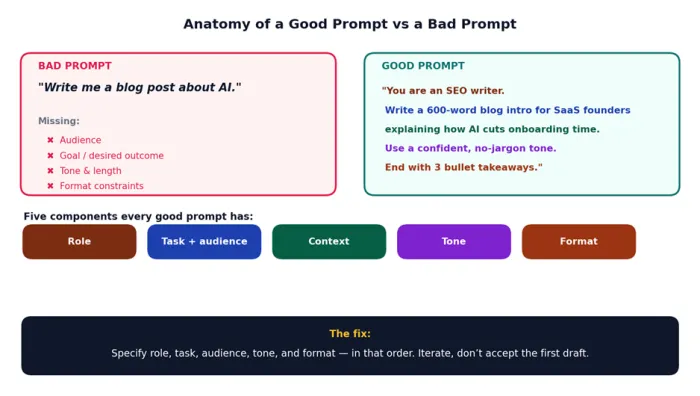
Figure 1. A vague prompt and a structured prompt, side by side. The five components every good prompt has.
The fix: Every prompt needs five components, in this order: Role ("you are a..."), Task ("write/analyse/summarise..."), Audience, Tone, and Format. Add a one-line example of the output you want when in doubt.
MISTAKE #2
Trusting AI Outputs Without Verification
Large language models are trained to sound confident, not to be correct. They will deliver a fabricated statistic, a made-up court case, or a non-existent research paper in the same tone they use for facts they got right. This is called hallucination, and it is not going away - it is structurally built into how these models work.
The data: A 2026 benchmark of leading models found hallucination rates between 15% (Grok 4) and 33% (DeepSeek V3.2) on factual recall tasks. Pennsylvania researchers found that users tend to accept ChatGPT outputs at face value even when those outputs are wrong.
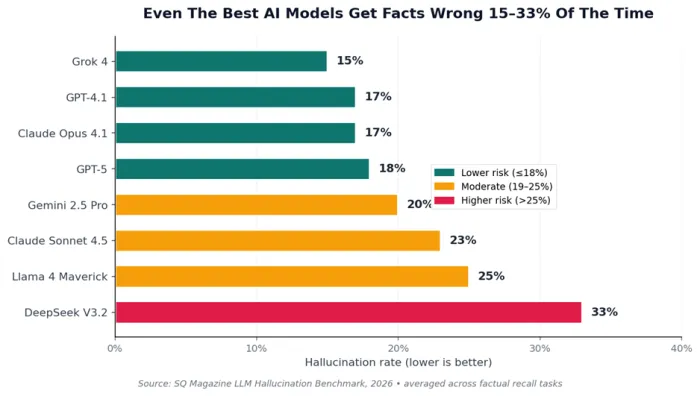
Figure 2. Hallucination rates for popular AI models in 2026. None are zero. Lower is better.
The fix: Treat every factual claim from an AI as a draft, not a fact. Verify any name, number, quote, or citation against a primary source before you use it. For high-stakes work, use models with reasoning mode plus web search - these can cut hallucinations by roughly half.
MISTAKE #3
Pasting Confidential Data Into Consumer AI Tools
When you paste a contract, a customer list, source code, a medical record, or an unreleased product roadmap into a free AI tool, you are submitting that data to a third-party system whose terms typically allow retention, processing, and - in many cases - use for model training. The violation occurs at the moment of submission, regardless of whether visible harm follows.
The data: A 2025–2026 employee survey found 93% of employees admit to using AI tools their company hasn’t approved, 37% have shared private internal company data with these tools, and 32% have entered confidential client data. In 2026, a U.S. federal court ruled that AI conversations with consumer tools are not protected by attorney-client privilege.
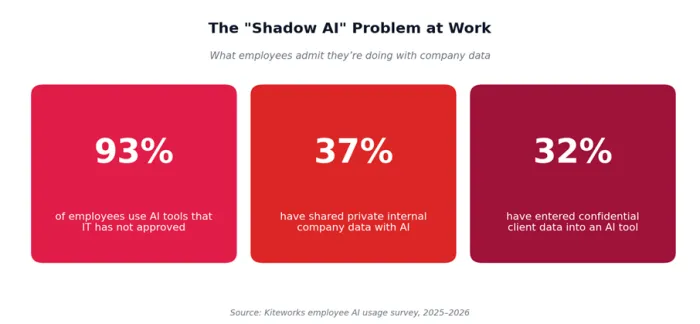
Figure 3. The "shadow AI" problem: most employees are already doing this, often without realising it.
The fix: Use enterprise-tier AI tools that contractually prohibit training on your data; turn off "Improve the model" toggles in consumer tools; sanitize prompts (strip names, IDs, financials) before submitting; and never paste anything you wouldn’t email to a competitor.
MISTAKE #4
Treating AI As a Real-Time Search Engine
A standard chatbot without web search has a fixed knowledge cut-off date. Asking it for today’s stock price, last night’s sports score, or this morning’s news guarantees stale or invented information. Worse, when asked to cite sources, models routinely fabricate URLs that look real but lead nowhere or to unrelated content.
The data: University of Maryland Libraries documents that "when ChatGPT gives a URL for a source, it often makes up a fake URL, or uses a real URL that leads to something completely different." Fact-checking is required for every cited link.
The fix: For anything time-sensitive, use an AI tool with live web search and inline citations turned on. Verify each cited URL by clicking it. Use traditional search engines for transactional queries (booking, navigating, prices) where AI is structurally weaker.
MISTAKE #5
Using AI for Tasks It Is Bad At
AI assistants are excellent at writing, summarising, translating, brainstorming, explaining, and pattern-matching across large text. They are notably weaker at precise arithmetic, original creative breakthroughs, fast-changing factual recall, and high-stakes professional judgment. Mismatching tool to task is a hidden cause of wasted hours.
| Task type | Why AI struggles |
|---|---|
| Live data (prices, news, scores) | Knowledge cut-offs; out-of-date answers |
| Precise math on large numbers | Token-based reasoning; arithmetic errors are common |
| Citing primary sources | Models invent plausible-looking URLs and DOIs |
| Original creative concepts | Outputs are statistical recombinations of prior text |
| Highly local context | Lacks knowledge of your team, codebase, or jurisdiction |
| High-stakes legal or medical advice | Hallucinations + no accountability for harm |
Table 2. Tasks where AI struggles and why.
The fix: Match the tool to the task. Use AI to draft, edit, summarise, translate, code-assist, and brainstorm. Pair it with a calculator for math, a search engine for live data, and human review for high-stakes decisions.
MISTAKE #6
Accepting the First Draft Without Iterating
Most users send one prompt, copy the response, paste it somewhere, and call it done. This wastes most of the value AI offers. The first draft is rarely the best the model can produce - it is just the first one. Conversational AI is designed to refine through multi-turn feedback, and that is where output quality jumps from "okay" to "publishable."
The single most underused move in AI is asking the model to critique its own answer. "What is wrong with this?" or "Argue against the position you just took" routinely surfaces gaps the user would never have noticed.
The fix: Build an iteration loop into every session. After the first response, ask: (1) "What did you miss?", (2) "Now rewrite this for [tighter audience]", (3) "Give me three alternative versions and explain the trade-offs". Two extra turns will roughly double output quality on most tasks.
MISTAKE #7
Cognitive Offloading and Skill Atrophy
Cognitive offloading is the habit of handing every thought-task to AI: writing, summarising, deciding, even feeling. In moderation it is a productivity boost. Past that line, peer-reviewed research in 2025 and 2026 has identified measurable side-effects - weakened critical thinking, reduced introspection, and erosion of professional skill in fields like UX design and software engineering.
The data: A 2026 University of Pennsylvania paper found that users frequently accept AI outputs as correct even when they are not - a phenomenon researchers labelled "uncalibrated trust." The more often you outsource a thought, the harder it gets to do that thought yourself.
The fix: Use AI to assist your thinking, not replace it. Form your own draft answer first, then ask AI to critique or improve it. Reserve "let AI do the whole thing" for low-stakes, low-creativity work where skill atrophy doesn’t matter.
MISTAKE #8
Ignoring Built-In Bias in Outputs
Every AI model inherits patterns from its training data - including political tilts, cultural defaults, big-brand bias, and gender or racial skews documented across years of academic research. These biases don’t announce themselves; they show up quietly in the recommendations, examples, and framings the model picks. When you ask "what are the best X?" or "is Y a good idea?" you are getting one biased perspective dressed as neutral analysis.
Generative engine optimization studies in 2026 have shown that AI search engines disproportionately cite earned media and large brand domains, marginalising smaller but accurate sources. The same effect distorts professional outputs.
The fix: Cross-check important answers across two different models (the spread between providers is wider than most people assume). Explicitly ask for "the strongest counter-argument" or "perspectives this answer is missing". Audit recommendations for over-representation of well-known brands.
Your 8-Point AI Self-Audit
Run this checklist before pressing send on a prompt or shipping anything an AI helped you produce. If you can’t tick all eight boxes, fix what you missed before going further.
| Did you do this before sending the prompt or shipping the output? | |
|---|---|
| ☐ | My prompt names a role, task, audience, tone, and format. |
| ☐ | I have not pasted any client names, financials, source code, or PII into a consumer AI tool. |
| ☐ | Model training is turned off in my AI tool’s privacy settings. |
| ☐ | Any factual claim I plan to use has been verified against a primary source. |
| ☐ | Any cited URL or quotation in the output has been opened and confirmed real. |
| ☐ | I have iterated on the output at least once - not shipped the first draft. |
| ☐ | For decisions with consequences, a human (me) is the final reviewer. |
| ☐ | If the topic is fast-changing, I used a model with web search enabled. |
Table 3. The pre-send checklist that prevents almost every common AI mistake.
Use AI Like a Professional
None of these mistakes are about AI being bad. They are about how easy it is to use a powerful tool carelessly. Fix the eight habits above and the same prompts in the same model will produce dramatically better results - with a fraction of the risk.
RedeepSeek is built with the safer defaults this guide recommends: cited web search, document and image analysis, multi-language support, code assistance, and SOC 2-grade infrastructure that doesn’t train on your conversations. The Free plan gives you 50 messages per day with no credit card; the Starter plan adds web search and content tools at $10/month; the Professional plan unlocks unlimited messages, document analysis, and team workspaces at $18/month.