Redeepseek is an AI chat assistant built for everyday work tasks. The Redeepseek homepage describes the tool as a single platform for generating content, writing code, analyzing documents, searching the web, and answering questions. The full feature set goes well beyond the six headline capabilities. It also covers conversation history, custom AI personas, team workspaces, API access, security baselines, response speed tiers, and platform availability. This guide walks through every documented feature in plain language, then maps each one to the kind of work it actually supports.
What Redeepseek Does
At its core, Redeepseek is a chatbot. A question goes in, an answer comes out. The difference from a basic search engine is that the answer arrives in full sentences, can be edited, refined, translated, or rewritten in a different tone, and can pull from uploaded files or live web results.
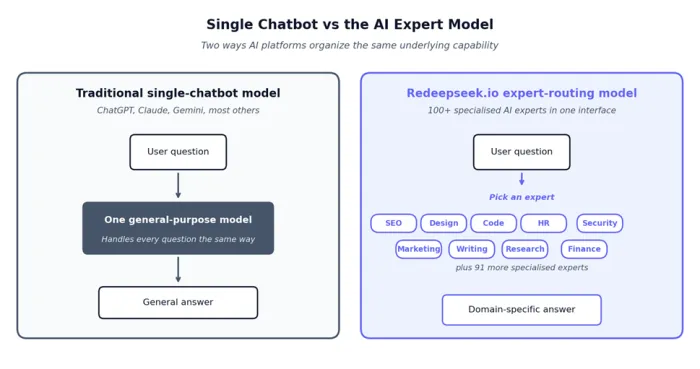
Per the Redeepseek about page, the platform combines large language models with a single chat interface. The same conversation thread can handle a writing task, a code question, an image upload, and a translation request without restarting or switching to another app.
The simplest way to picture Redeepseek: one chat box that handles writing, code, research, document review, and translation, with no app switching between tasks.
Core Capabilities at a Glance
The capabilities table below mirrors the structure used on the Redeepseek homepage. Each row points to a different type of request the chat window can handle.
| Capability | What It Handles | Typical Work Use |
| Chat Assistant | Open conversation, brainstorming, plain Q and A | Quick answers, idea exploration, meeting prep |
| Content Generation | Blogs, emails, ad copy, social posts, product descriptions | Marketing drafts, client emails, internal memos |
| Code Assistant | Writing, debugging, and explaining code across 30+ languages | Bug fixes, scripting, code review prep |
| Web Search | Live web results with cited sources | Market checks, competitor research, fact verification |
| Image Understanding | Reads uploaded images, charts, screenshots | Pulling data from a chart, describing a layout |
| Multi-Language Support | 50+ languages for chat and content output | Translation, localized copy, cross-border communication |
Chat Assistant in Detail
The chat assistant is the default mode and the entry point to every other feature. The Redeepseek homepage describes it as natural, context-aware conversation backed by advanced large language models.
Three behaviors stand out in regular use:
Context retention across the thread. A follow-up question builds on the previous answer, so requests like "now make it shorter" or "translate that into French" work without repasting the original text.
Open-ended brainstorming. The chat accepts loose prompts and returns structured suggestions, which fits early-stage thinking on a project brief or a campaign concept.
Iterative refinement. Replies can be reshaped through follow-ups asking for different tones, lengths, formats, or audiences, without needing to specify everything upfront.
Content Generation Sub-Features
Content generation is the most-promoted feature on the Redeepseek homepage. It covers a range of output types, each with its own format expectations. The table maps the documented content types to the workplace tasks they fit.
| Content Type | Output Shape | Workplace Task |
| Blog post | Title, intro, body sections with H2s, closing | Marketing publications, knowledge base articles |
| Email draft | Subject line, greeting, body, sign-off | Sales outreach, client updates, internal memos |
| Ad copy | Headline plus short variants for testing | Paid social, search ads, banner campaigns |
| Social post | Short caption with optional hashtags | LinkedIn updates, X threads, Instagram captions |
| Product description | Feature-led paragraph or bullet list | E-commerce listings, catalog entries |
| Brand voice variations | Tone-adapted versions of the same draft | Voice matching across teams or markets |
The homepage live preview demonstrates a product launch email written from a one-line prompt, then translated into Spanish and French within the same conversation. Brand voice tailoring is mentioned as a built-in option, meaning a single draft can be regenerated for a more formal or more casual audience without rewriting from scratch.
Code Assistance Across Programming Languages
The Redeepseek homepage states the code assistant covers 30+ programming languages and handles tasks from "quick scripts to complex architecture guidance." The Redeepseek pricing page confirms the 30+ language coverage is gated to the Professional plan.
Three categories of coding help are documented:
- Code writing. Generating functions, scripts, boilerplate, and templates from a plain-English description.
- Debugging. Identifying issues in a pasted snippet and returning a corrected version with brief notes on what changed.
- Code explanation. Walking through unfamiliar code in plain language, useful during onboarding or pull request reviews.
| Coding Task | Example Prompt | Output Style |
| Generate | "Write a JavaScript function to sort an array of objects by date." | Working code block with brief inline comments |
| Debug | "This Python function returns NoneType when the input is empty. Fix it." | Corrected snippet plus a one-line explanation |
| Explain | "Walk through what this SQL CTE does in plain English." | Step-by-step text breakdown of the query |
| Refactor | "Convert this callback-based code to async/await." | Rewritten version with structural notes |
| Architecture | "Outline a folder structure for a small Node API." | Bulleted layout plus rationale per folder |
Web Search Integration Mechanics
Web search is what separates the chatbot from a closed-data model. According to the Redeepseek homepage, the web search feature pulls real-time information with cited sources that can be verified. The Redeepseek pricing page lists web search under both the Starter and Professional plans, with Professional getting the upgraded version called "Advanced web search + citations."
The practical use cases include:
- Live data lookups. Current prices, recent news, latest version numbers, today's exchange rates.
- Source verification. The chatbot returns links alongside the answer, which lets a reader confirm the claim before acting on it.
- Market and competitor scans. Quick comparisons across vendor pricing pages, public statements, or product launches.
Per the Redeepseek FAQ page, the recommendation is to verify critical information independently. Treat the chatbot as a fast first pass, not a final source.
Image Understanding Capabilities
Image understanding is a Professional-plan feature, per the Redeepseek pricing page. It accepts uploaded images and returns analysis in text. The homepage lists four specific use cases: analysis, description, data extraction, and visual Q and A.
| Image Task | What It Does | Common Use |
| Image analysis | Identifies objects, layout, and visible elements | Reviewing a design mockup or photo |
| Description | Writes a plain-text description of the image | Accessibility alt text, content summaries |
| Data extraction | Pulls numbers or labels from charts and tables | Converting a screenshot of a graph into figures |
| Visual Q and A | Answers specific questions about an image | "What does the trend in this chart suggest?" |
| Document image reading | Reads text inside scanned documents or screenshots | Quoting from an image of a PDF page |
| Chart reading | Describes axes, trend lines, and key points | Summarizing a dashboard view in writing |
Multi-Language Support and Translation
Redeepseek supports 50+ languages for both conversation and content generation, per the Redeepseek FAQ page. The same page names a sample of the supported set: English, Spanish, French, German, Chinese, Japanese, Hindi, and Arabic, with others not individually listed.
Three patterns of multi-language work fit the platform:
- Translation in place. A drafted English email can be translated into Spanish or French without leaving the thread.
- Original creation in another language. Content can be generated directly in the target language rather than translated from English.
- Localization adjustments. Tone, formality, and idiom choices can be adjusted per region, useful for customer support scripts or product copy.
Productivity Layer Personalization Features
Beyond the six headline capabilities, the Redeepseek pricing page lists several productivity features that affect how a user organizes and reuses work over time.
| Feature | Description | Available On |
| Custom AI personas | Saved chatbot personalities with preset tone and rules | Professional, Custom |
| Custom templates | Reusable prompt templates for repeat tasks | Professional, Custom |
| Conversation history (15 days) | Stored past conversations for 15 days | Starter |
| Conversation history (50 days) | Extended history retention for 50 days | Professional |
| Single conversation thread | One active conversation at a time | Free Trial |
| Multi-thread conversations | Multiple parallel threads | Starter, Professional, Custom |
| One-click export | Copying or exporting results to other tools | All plans |
Custom personas and templates are the features most likely to compound time savings over weeks of use. A weekly client update, for example, only needs its persona and template configured once.
Team Workspace and Collaboration Tools
Team features unlock at the Professional tier and expand further on Custom plans, per the Redeepseek FAQ page. The documented team capabilities cover shared usage, governance, and analytics.
| Team Feature | Function |
| Team workspace (up to 5 seats) | Five users share a single workspace on Professional |
| Shared workspaces | Multiple users access the same conversation surface |
| Conversation history (shared) | Past threads visible across the team |
| Custom prompt libraries | Saved prompts available to all workspace members |
| Admin controls | Access management for workspace members |
| Usage analytics | Reporting on team activity and message volume |
The pricing page notes that team pricing for 10+ seats requires a separate conversation with sales, which falls under the Custom plan.
Enterprise-Grade API and Custom Plan Features
The Custom / API plan, per the Redeepseek pricing page, targets engineering teams and enterprise rollouts. Features here cover integration, deployment flexibility, and service guarantees.
| Enterprise Feature | What It Provides |
| Full REST API access | Programmatic access to the chatbot through standard endpoints |
| Comprehensive documentation | Developer-facing reference materials |
| SDKs for popular languages | Pre-built client libraries |
| Custom rate limits | Adjusted per-account request ceilings |
| Custom SLAs | Negotiated service level agreements |
| Dedicated infrastructure | Isolated environment for the customer |
| SSO and SAML integration | Enterprise single sign-on support |
| Custom model fine-tuning | Tuning the model on customer-specific data |
| Webhook support | Event-driven triggers from the platform |
| Automation support | Workflow chaining with external systems |
| Dedicated account manager | Named contact for support and onboarding |
| 99.9% uptime guarantee | Contractual reliability commitment |
| On-premise deployment option | Self-hosted installation for restricted environments |
Full Plan-by-Plan Feature Comparison
The master table below consolidates every documented feature against every plan. It is built from the Redeepseek pricing page entries.
| Feature | Free | Starter | Professional | Custom |
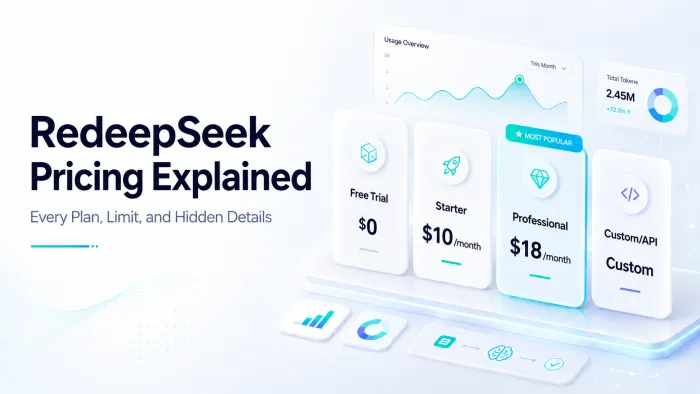
| Price (monthly) | $0 | $10 | $18 | Custom |
| Messages per day | 50 | 500 | Unlimited | Custom |
| Response speed | Standard | Standard | Priority | Custom |
| Content generation | Basic | Full suite | Full suite | Full suite |
| Web search | No | Yes | Advanced + citations | Yes |
| Document analysis | No | No | Yes | Yes |
| Image understanding | No | No | Yes | Yes |
| Code assistant (30+ languages) | No | No | Yes | Yes |
| Multi-language (50+) | No | Yes | Yes | Yes |
| Custom AI personas | No | No | Yes | Yes |
| Conversation history | Single thread | 15 days | 50 days | Custom |
| Team workspace | No | No | Up to 5 | Custom |
| REST API access | No | No | No | Yes |
| SSO and SAML | No | No | No | Yes |
| Fine-tuning | No | No | No | Yes |
| Webhook automation | No | No | No | Yes |
| On-premise deployment | No | No | No | Yes |
| Support | Community | Priority | Account manager |
Annual billing applies a 20% discount across the paid plans, per the Redeepseek pricing page. Starter annual is listed at $96 per year, equivalent to $8 per month. Professional annual is listed at $172.80 per year, equivalent to $14.40 per month.
Where the Tool Fits Across Different Roles
Most professionals run into the same handful of recurring tasks: drafting messages, summarizing material, hunting for facts, fixing small code issues, or translating something. The table below maps common roles to the features they will lean on most.
| Role | Day-to-Day Tasks Redeepseek Can Reduce |
| Marketers | Launch emails, ad headlines, social captions, blog drafts, brand-tone variations |
| Developers | Boilerplate code, error message lookups, function explanations, refactor suggestions |
| Researchers | PDF summaries, chart-to-text extraction, cited reference gathering, web checks |
| Operations | SOPs, checklists, policy rewrites, internal documentation |
| Support Teams | Translated replies, draft responses, simplified explanations, FAQ drafting |
| Founders | Strategy brainstorms, investor updates, legal text review, market scans |
| Designers | Layout descriptions, copy variants, accessibility text from images |
| HR | Job description drafts, policy text simplification, multilingual communication |
Step-by-Step Path From Sign-Up to First Output
The Redeepseek homepage frames onboarding as a three-step process. In practice, the flow expands slightly once a free account is active. The six steps below cover the full first session.
1. Account creation. Per the Redeepseek homepage, the free trial requires no credit card and includes 50 messages a day to start.
2. Chat window access. The single interface handles every task, regardless of whether the request is for writing, code, or document analysis.
3. Clear prompt entry. Specific prompts produce better outputs than vague ones. Stating the format, audience, and length helps the model land closer to the target on the first try.
4. File attachment when needed. Document and image analysis is bundled into the Professional plan, based on the Redeepseek pricing page.
5. Follow-up refinement. Replies can be adjusted by asking for a shorter version, a different tone, or a translation, without restarting the conversation.
6. Export and reuse. The final text copies into the destination tool, whether that is an email client, code editor, CMS, or document.
The pattern most users settle into: type, review, refine, then paste into the real work tool. Redeepseek is the draft surface, not the final destination.
Sample Outputs Across Common Work Tasks
Outputs differ in length and shape depending on the request. The table below shows what a single short prompt typically produces, based on the live preview shown on the Redeepseek homepage and the documented capability set.
| Prompt Type | Example Input | Output Shape |
| Email draft | "Write a product launch email for an AI analytics tool." | Subject line, greeting, three-bullet feature list, closing CTA |
| Code snippet | "Write a Python function to deduplicate a CSV by email." | Working code block with brief inline comments |
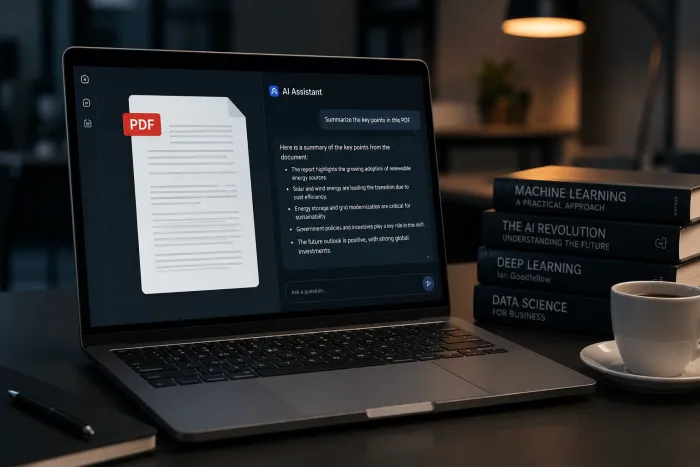
| Document summary | "Summarize this 12-page PDF in five bullets." | Five-bullet condensed recap, one idea per line |
| Translation | "Translate the email above into French and Spanish." | Two clean translations with formatting preserved |
| Web search | "Find current pricing for Slack Enterprise plans." | Plain-language answer plus cited links |
| Image read | "What does this chart show?" | Description of axes, the visible trend, and the main takeaway |
| Persona-led draft | "Reply to this customer using the friendly support persona." | Tone-matched reply ready for review |
| Brainstorm | "Give five angles for a blog post on remote hiring." | Five distinct angle pitches with one-line hooks |
Prompt Patterns That Lead to Better Replies
The single biggest lever on output quality is how a request is phrased. Vague prompts produce generic replies. Specific prompts produce useful ones. The pairs below show the same intent written two ways.
| Weak Prompt | Stronger Version |
| "Write a blog post about AI." | "Write a 600-word blog post for small business owners on three practical ways AI can save time, friendly tone, no jargon." |
| "Fix this code." | "This Python function returns the wrong total when the input list is empty. Identify the bug and show the corrected version." |
| "Summarize this document." | "Summarize this report in five bullets aimed at a CFO. Highlight cost numbers and risks only." |
| "Translate this." | "Translate this customer email into formal Spanish, keep the apology in the second line intact." |
| "Help with an email." | "Write a polite three-sentence email declining a meeting next Tuesday and proposing two alternate times the following week." |
| "Make this image into text." | "Extract the data from this bar chart into a table with two columns: month and revenue." |
A useful test: if a junior assistant could not act on the prompt as written, the chatbot probably cannot either. The missing detail needs filling in.
Bottom Line for Work Use
Redeepseek's appeal for work is breadth, not specialization. A marketer who also dips into a little code, a researcher who handles screenshots and PDFs, or a support lead who toggles between English and Spanish replies all benefit from having one chat surface for the entire mix.
The Starter plan at $10 a month covers most light-to-moderate use cases, including web search, content generation, and multi-language support. The Professional plan at $18 a month becomes necessary once document analysis, image reading, custom personas, team sharing, or code assistance enters the picture. The Custom plan is the right answer only when REST API access, SSO, fine-tuning, or on-premise deployment are non-negotiable. For anyone undecided, the free trial answers the only question that really matters: whether the chatbot fits the way the work actually gets done.